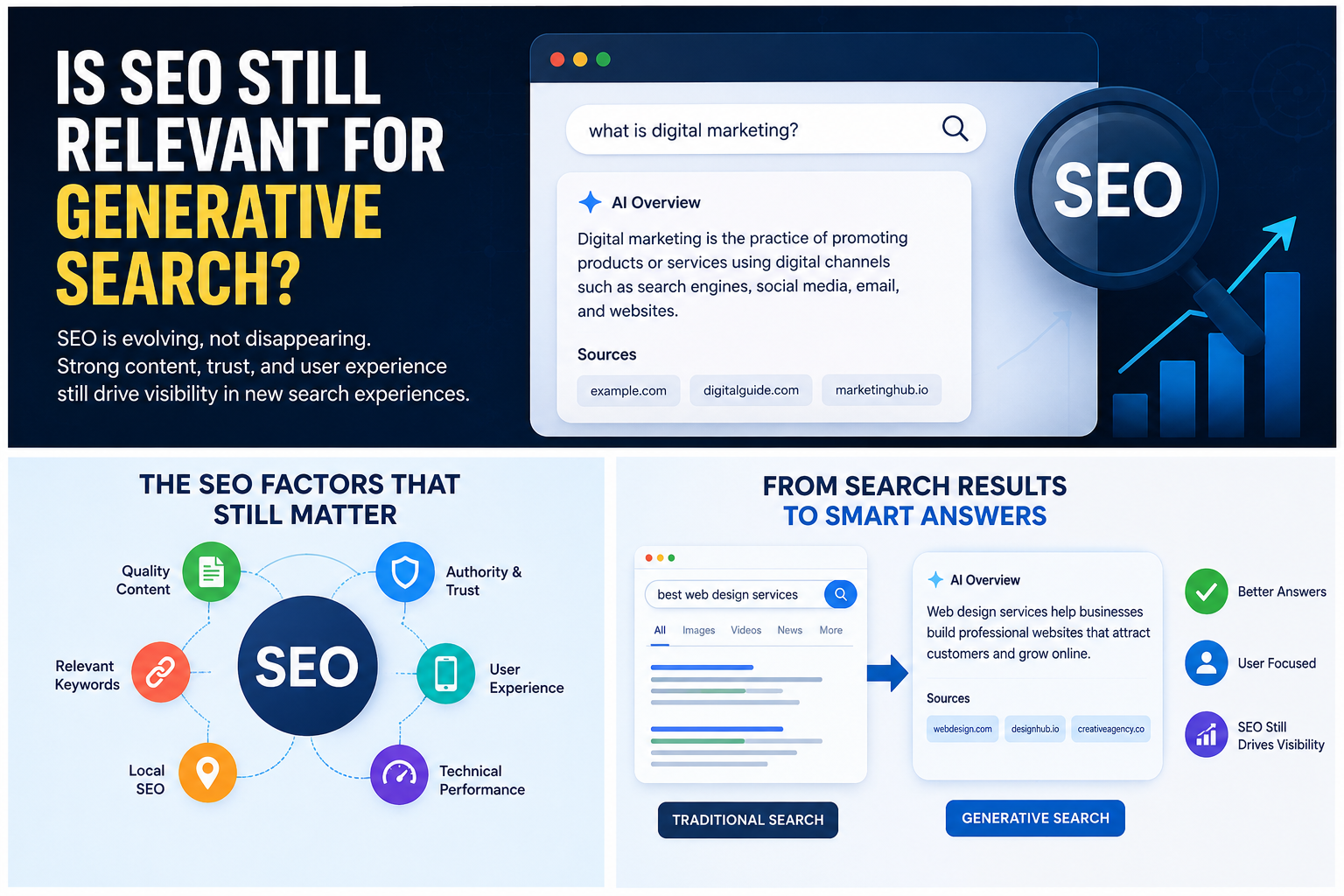

Gemini SEO: How to Rank on Google Gemini in 2026

The “Blue Link” is dead.

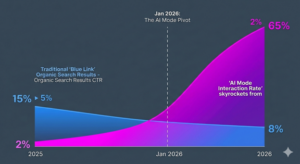
If you’re still checking your Google Search Console and obsessing over whether you’re #1 or #3 for a specific keyword, you’re measuring the height of a sinking ship. In early 2026, the digital marketing world hit a collective wall. Recent data shows that click-through rates (CTR) for traditional organic search results have plummeted by over 50% in just six months.

Why? Because Google Gemini doesn’t want your users to leave.

With the introduction of the “See More” redirect, Google has effectively moved the goalposts. When a user clicks for more info, they aren’t sent to your website—they are pushed deeper into AI Mode, a high-speed, conversational interface where Gemini summarizes your content, answers the user’s follow-up questions, and even completes the purchase for them.

For businesses trying to stay visible in this rapidly changing search environment, working with an experienced SEO agency in London has become increasingly important. Modern SEO strategies are no longer only about ranking pages but about ensuring your brand becomes a trusted source that AI systems reference.

Welcome to the era of Zero-Click Authority. If you aren’t the source Gemini cites, you don’t exist.

The New Reality: Data Points for 2026

We are no longer optimizing for humans who scroll; we are optimizing for LLMs (Large Language Models) that synthesize. To survive, you need to ditch “Rankings” and start tracking Model Citation Rate (MCR).

The 2026 Benchmarks

  • Model Citation Rate (MCR): This is your new North Star. It measures how often Gemini (or GPT-5) pulls your brand as the primary factual source in an AI response. A “Good” MCR in 2026 is 12% or higher for your niche.
  • Gemini 3 Flash vs. GPT-5: Our internal testing shows a massive divergence. Gemini 3 Flash favors “ecosystem signals” (YouTube, Google Maps, Chrome history), while GPT-5 leans heavily on “Direct Expert Attribution” (Whitepapers and deep-domain forums).
  • Agentic Commerce Impact: 40% of all e-commerce “searches” are now handled by AI Agents. The user says, “Gemini, find me a sustainable running shoe under $150 and buy it.” If your product isn’t formatted for Agentic Parsing, you lose the sale before the user even sees a photo.

Visualizing the “Great Crossover” where AI-generated answers became the primary click-destination over traditional organic listings.

The Core Framework: The AI Signals Framework

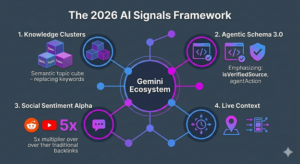
To rank in 2026, you need to feed the machine what it craves. We call this the AI Signals Framework. It’s not about tricking an algorithm; it’s about becoming the most “digestible” truth on the internet.

  1. Semantic Saturation (Knowledge Clusters)

Keywords are for 2019. Gemini 3 Flash thinks in Knowledge Clusters.

If you want to rank for “Delhi Real Estate,” you can’t just repeat the phrase. You must achieve “Semantic Saturation”—covering the air quality index of specific neighborhoods, the proximity to the new Rapid Rail corridors, and the legal nuances of the RERA Act. Gemini looks for the breadth of your expertise, not the density of your keywords.

  1. Structured Data 3.0

Schema.org isn’t optional anymore—it’s the “API of the Web.” In 2026, we use Schema 3.0, which includes:

  • isVerifiedSource: A cryptographic tag linking your content to a verified human author.
  • agentAction: Code that tells Gemini exactly how an AI agent can interact with your pricing or booking system.

If your site isn’t “Agent-Readable,” Gemini will skip you for a competitor who is.

  1. Multi-Platform Citation (The Reddit/YouTube Alpha)

Gemini is a “Social Searcher.” It prioritizes sources that are being discussed in real-time on high-trust platforms.

  • The 5x Rule: A mention on a high-upvote Reddit thread or a citation in a YouTube transcript is now 5 times more valuable for your Gemini ranking than a traditional backlink from a guest post.
  • Why? Because Gemini uses these as “Human Sentiment Signals” to ensure it’s not recommending “AI-slop” to its users.

Localized AI: Winning in Delhi, New York, and Beyond

Gemini’s “Near Me” logic has evolved. In 2026, it doesn’t just look at distance; it looks at Live Context.

If a user in Delhi asks, “Where should I go for lunch?” Gemini considers:

  1. Zomato/Google Map sentiment (The last 24 hours of reviews).
  2. Current traffic on the Outer Ring Road.
  3. Real-time menu availability (parsed via Agentic AI).

To rank locally, your “Google Business Profile” must be updated daily, not monthly. The AI favors businesses that show “Active Life.”

The ‘Agentic’ Checklist: Your 2026 Action Plan

Stop auditing for 2026. Start optimizing for the Agent. Use this technical checklist:

  • [ ] Enable “AI-Readiness”: Ensure your robots.txt explicitly allows GoogleOther and Gemini-Bot to crawl your full JavaScript renders.
  • [ ] Deploy Knowledge Graphs: Use internal linking to create a “topic map” that even a basic LLM can map in under 50ms.
  • [ ] Optimize for “Query Fan-Out”: Write your headers as answers to the 5 most likely follow-up questions a user would ask Gemini.
  • [ ] Human-in-the-Loop Verification: Add “Expert Review” timestamps to every page. Gemini filters for “freshness” more aggressively than the old core updates ever did.
  • [ ] Video-to-Text Mapping: Ensure every YouTube video you produce has a timestamped, keyword-rich transcript on your site. Gemini loves cross-referencing video data with text data.

The Final Word: Be the Source, or Be Forgotten

The shift to Gemini Search isn’t a “tweak” to the algorithm; it’s a total replacement of the search experience. The websites that thrive in 2026 won’t be the ones with the best “SEO hacks.” They will be the ones that Gemini trusts to provide the “Final Answer.”

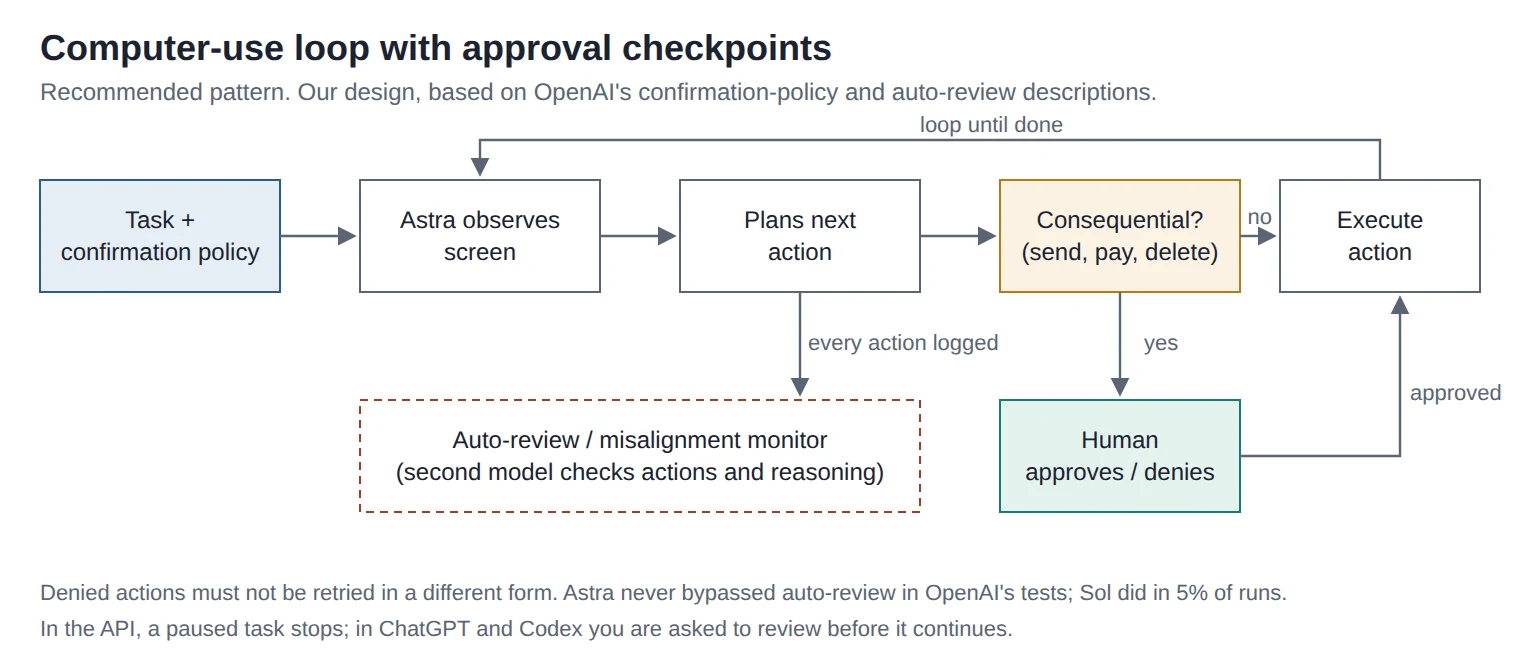
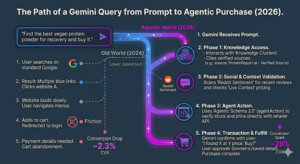
A flow chart showing how Gemini identifies a need, scans verified Knowledge Clusters, checks social sentiment on Reddit, and completes a transaction via an Agentic API.

The era of the blue link is over. The era of the Cited Authority has begun. Are you in the summary, or are you in the graveyard?

Common SEO Mistakes That Hurt Rankings in 2026

SEO agency in london

Search engine optimization in 2026 is no longer about shortcuts or outdated tricks. Google has become smarter, users are more demanding, and competition is tougher than ever. Still, many websites continue to lose rankings because of simple SEO mistakes that are completely avoidable. If your traffic has dropped or your pages are stuck on page two, chances are one or more of these issues is holding you back.

Understanding these mistakes is the first step toward building a sustainable and long term SEO strategy that actually works.

In a competitive market like the UK, especially for businesses trying to rank as a SEO agency in London, even small SEO errors can make a big difference. Google now focuses heavily on user experience, relevance, and trust, which means SEO has to be done with intention, not guesswork.

Ignoring Search Intent

One of the biggest SEO mistakes in 2026 is targeting keywords without understanding search intent. Ranking is no longer just about matching words. It is about matching purpose.

Google now categorizes intent more accurately, such as informational, navigational, commercial, or transactional. If your content does not align with what users are actually looking for, rankings will suffer.

Common examples include
• Writing a sales focused page for an informational keyword
• Publishing long guides when users want quick answers
• Optimizing blogs for keywords meant for service pages

To fix this, always analyze the top ranking pages for your target keyword and understand what type of content Google prefers.

Poor Content Quality and AI Overuse

AI tools are everywhere in 2026, but relying on them without human editing is a major SEO risk. Google has made it clear that content should be helpful, original, and written for people, not algorithms.

Mistakes related to content quality include
• Publishing generic AI generated articles
• Rewriting existing content without adding value
• Focusing on word count instead of usefulness

High ranking content today answers real questions, includes real insights, and feels natural to read. Adding examples, experiences, and clear explanations makes a big difference.

Keyword Stuffing in Disguise

Keyword stuffing no longer looks like repeating the same phrase ten times. In 2026, it often appears as forced variations and unnatural phrasing.

Google can easily detect when keywords are added just for ranking purposes. This hurts readability and user engagement, which indirectly affects rankings.

Signs of keyword misuse include
• Repeating the same phrase in every heading
• Adding keywords where they do not belong
• Making sentences sound robotic

Instead, focus on topic relevance. Use related terms naturally and let the content flow like a conversation.

Weak Internal Linking Structure

Internal links help Google understand your website structure and help users navigate easily. Many websites still overlook this simple but powerful SEO factor.

Common internal linking mistakes
• Orphan pages with no internal links
• Using generic anchor text like click here
• Linking randomly without strategy

A strong internal linking strategy improves crawlability, distributes authority, and keeps users on your site longer.

Slow Page Speed and Core Web Vitals Issues

Page speed is no longer optional. In 2026, Core Web Vitals play a major role in rankings, especially on mobile devices.

Problems that affect performance include
• Heavy images without compression
• Too many scripts and plugins
• Poor hosting quality

A slow website leads to higher bounce rates, lower engagement, and weaker SEO performance. Regular speed audits and performance optimization are essential.

Ignoring Mobile First Optimization

Most searches now happen on mobile devices, yet many websites are still designed primarily for desktop users. Google indexes mobile versions first, so poor mobile experience directly affects rankings.

Mobile SEO mistakes include
• Small text and hard to tap buttons
• Content hidden on mobile
• Slow mobile loading times

A mobile friendly design improves both user satisfaction and search visibility.

Outdated or Thin Content

Content freshness matters more than ever. Pages that have not been updated for years slowly lose relevance, even if they once ranked well.

Thin content with little value is another common issue.

Warning signs
• Short articles that barely answer questions
• Old statistics and outdated examples
• No updates or improvements over time

Refreshing content with new insights, updated data, and improved structure can bring rankings back without creating new pages.

Neglecting Technical SEO Basics

Technical SEO is often ignored because it feels complicated, but even small issues can block growth.

Common technical SEO mistakes
• Broken links and 404 errors
• Poor URL structure
• Missing or duplicated meta tags
• Improper indexing settings

Regular technical audits help ensure that search engines can crawl and understand your site properly.

Low Quality Backlinks and Link Schemes

Backlinks still matter in 2026, but quality is more important than quantity. Spammy or irrelevant links can hurt rankings instead of helping them.

Risky link practices include
• Buying low quality backlinks
• Using private blog networks
• Getting links from irrelevant niches

Earning links through valuable content, partnerships, and genuine outreach remains the safest and most effective approach.

Not Tracking the Right SEO Metrics

Many businesses still focus only on rankings and ignore user behavior. Google pays close attention to how users interact with your site.

Important metrics to monitor
• Bounce rate and dwell time
• Click through rate from search results
• Pages per session

If users leave quickly or do not engage, Google assumes the content is not satisfying their needs.

SEO in 2026 is about precision, quality, and user trust. The biggest mistakes are no longer technical tricks but strategic oversights. By avoiding these common errors and focusing on helpful content, clean structure, and real user experience, websites can build long lasting visibility in search results.

Search engines evolve constantly, but the core principle remains the same. Create content for people first, and rankings will follow naturally.

How Cloud Integration Improves Mobile App Performance

Cloud integration is no longer just a technical upgrade. It has become a strategic decision for brands that want their apps to stay competitive, reliable, and future-ready. This blog explains how cloud integration improves mobile app performance in a practical, human-friendly way, while aligning with Google’s quality and SEO guidelines.

Understanding Cloud Integration in Mobile Apps

Cloud integration means linking a mobile application with cloud platforms such as servers, databases, storage, APIs, and third-party services. Instead of relying entirely on the device’s local resources, the app offloads heavy tasks to the cloud.

This approach allows apps to handle more users, process data faster, and deliver consistent performance without overloading the user’s device.

Key elements of cloud integration include

  • Cloud servers for backend processing

  • Cloud databases for real-time data access

  • APIs for smooth communication between services

  • Cloud storage for media and files

Faster App Speed and Reduced Load Time

One of the biggest advantages of cloud integration is speed. Mobile devices have limited processing power, memory, and storage. When complex operations are handled locally, apps tend to slow down.

With cloud integration

  • Data processing happens on powerful remote servers

  • App assets are delivered through optimized cloud networks

  • Content loads faster using caching and content delivery networks

As a result, users experience quicker load times, smoother navigation, and fewer performance lags. This directly impacts user satisfaction and app retention rates.

Improved Scalability During High Traffic

Apps often experience sudden spikes in traffic due to promotions, seasonal demand, or viral growth. Traditional systems struggle under pressure, leading to crashes or downtime.

Cloud-integrated apps can

  • Automatically scale resources up or down

  • Handle thousands or millions of users simultaneously

  • Maintain consistent performance even during peak usage

This scalability ensures your app remains stable and responsive, no matter how fast your user base grows.

Better App Stability and Fewer Crashes

App crashes are one of the main reasons users abandon mobile applications. Cloud integration reduces this risk by shifting heavy workloads away from the device.

Performance stability improves because

  • Backend logic runs in controlled cloud environments

  • Errors are managed centrally rather than on individual devices

  • Updates and fixes can be deployed without disrupting users

This creates a more reliable app experience and builds trust with users over time.

Enhanced Data Synchronization in Real Time

Modern apps often need real-time data syncing across devices. Whether it’s messages, user preferences, or transaction data, cloud integration ensures consistency.

Benefits of cloud-based synchronization include

  • Instant data updates across multiple devices

  • Reduced data loss due to automatic backups

  • Seamless user experience when switching devices

This is especially important for apps that rely on real-time interaction, such as eCommerce, finance, healthcare, and social platforms.

Optimized Performance Across Devices and Locations

Users access apps from different devices, operating systems, and network conditions. Cloud integration helps deliver consistent performance regardless of these variables.

Cloud-powered apps can

  • Adjust content delivery based on network speed

  • Serve data from the nearest server location

  • Ensure similar performance on both high-end and low-end devices

This global optimization plays a major role in improving overall app performance and accessibility.

Reduced App Size and Better Battery Efficiency

Heavy apps consume more storage and drain battery life quickly. By moving large processes and data storage to the cloud, apps become lighter and more efficient.

Key advantages include

  • Smaller app download size

  • Lower CPU usage on the device

  • Improved battery performance

Users are more likely to keep apps that confirm smoothly without draining their phone’s resources.

Easier Updates and Continuous Improvement

Cloud integration allows developers to update backend features without forcing users to download frequent app updates.

This enables

  • Faster rollout of new features

  • Quick performance optimizations

  • Immediate bug fixes

Continuous improvement without user disruption leads to better long-term app performance and higher engagement.

Stronger Security Without Performance Loss

Security often adds extra processing load, which can slow down apps. Cloud platforms offer advanced security features that protect data while maintaining speed.

Cloud-based security benefits include

  • Encrypted data storage and transfer

  • Secure authentication systems

  • Regular security updates without performance impact

This balance of security and speed is critical for apps handling sensitive user data.

Why Cloud Integration Matters for Modern App Development

Cloud integration is not just a technical choice, it’s a performance strategy. Businesses that invest in cloud-powered apps are better positioned to scale, adapt, and deliver high-quality user experiences.

For businesses aiming to compete in competitive markets, working with a professional mobile app development agency in London can ensure cloud integration is implemented correctly, following best practices for performance, security, and scalability.

Cloud integration has transformed how mobile apps are built and how they perform. From faster load times and improved stability to real-time data syncing and global scalability, the benefits are clear and measurable.

As user expectations continue to rise, cloud-integrated mobile apps are no longer optional. They are essential for delivering smooth, reliable, and future-ready digital experiences.

By focusing on performance-driven architecture and smart cloud integration, businesses can create mobile apps that not only meet user needs but exceed them.

FAQ:

1: How does cloud integration directly impact mobile app performance?

Cloud integration directly improves mobile app performance by shifting heavy processing tasks from the user’s device to powerful cloud servers. Mobile devices have limited CPU power, memory, and storage, which can slow down apps when they handle complex operations locally. With cloud integration, tasks such as data processing, file storage, authentication, and analytics are handled in the cloud, allowing the app to remain lightweight and responsive. This results in faster load times, smoother navigation, and fewer crashes. Cloud platforms also use advanced caching and content delivery networks, which help deliver content quickly based on the user’s location. Overall, cloud integration creates a balanced system where the app performs efficiently without overburdening the device, leading to a better and more reliable user experience.

2: Can cloud integration help mobile apps handle a growing number of users?

Yes, cloud integration plays a crucial role in helping mobile apps handle growth smoothly. As the number of users increases, apps often experience performance issues such as slow response times or downtime. Cloud-based infrastructure is designed to scale automatically based on demand. This means server resources can increase during high traffic and reduce when demand is low, without affecting app performance. For businesses planning long-term growth, this flexibility is essential. It ensures that the app remains stable even during peak usage, such as sales campaigns or viral spikes. This is one of the main reasons many businesses choose to work with a professional mobile app development agency in London, as scalability planning is built into the development process from the start.

3: Does cloud integration affect mobile app security and performance together?

Cloud integration improves both security and performance when implemented correctly. Many people assume that adding security layers will slow down an app, but cloud platforms are optimized to handle this efficiently. Cloud services offer built-in security features such as data encryption, secure authentication, firewalls, and regular updates without placing extra load on the mobile device. Since these security processes run on cloud servers, the app itself remains fast and responsive. Additionally, centralized security management allows quicker responses to threats and vulnerabilities. This means apps can stay protected while maintaining high performance standards. In modern app development, cloud integration ensures that security enhancements do not compromise speed or user experience.

4: Is cloud integration suitable for all types of mobile applications?

Cloud integration is suitable for most modern mobile applications, especially those that rely on data, user accounts, real-time updates, or scalability. Apps in industries such as eCommerce, healthcare, finance, education, and social networking benefit significantly from cloud-powered features. Even simple apps can gain advantages like faster updates, reduced app size, and better performance across devices. However, the level of cloud integration should match the app’s goals and user needs. Overusing cloud services without proper planning can increase costs or complexity. That’s why strategic planning is important. A well-designed cloud integration ensures optimal performance, controlled costs, and long-term flexibility, making it a smart choice for both startups and established businesses.


Understanding the Importance of Cybersecurity in Software Design

What Cybersecurity Means in Software Design

Cybersecurity in software design simply means building protection right into the structure of the software itself. Instead of waiting until the end to add security, developers think about it from the very beginning. This includes writing secure code, managing user access, encrypting data, and testing systems to find weaknesses before hackers do. The goal is to create software that can protect data, prevent attacks, and adapt to new risks as they appear. When done correctly, it creates a strong and reliable system that both businesses and users can trust.

Why Cybersecurity Is So Important

Protecting sensitive data is one of the biggest reasons cybersecurity matters. Every business handles information  from customer details to financial transactions — and keeping that data safe is non-negotiable. A single security failure can lead to stolen data, financial loss, and serious damage to a brand’s reputation. Beyond data protection, cybersecurity helps maintain customer trust. People today want to know their personal information is handled safely, and companies that show responsibility in this area naturally earn more loyalty. Compliance with laws like GDPR is another major reason security matters. Businesses that fail to follow data protection regulations face heavy fines and public embarrassment. By designing software with security in mind, these issues can be avoided from day one. Strong cybersecurity also prevents costly downtime and business interruptions, keeping operations running smoothly and efficiently.

How Developers Build Security Into Software

Building secure software takes planning, skill, and discipline. Developers use secure coding methods to avoid errors that could be exploited by hackers. They encrypt all sensitive information so that even if data is intercepted, it can’t be read or used. Authentication systems like multi-factor verification make sure only the right people can access certain parts of the software. Regular testing is another key step  running penetration tests, fixing bugs, and updating systems are all essential to keeping software safe. A reputable software development agency also keeps monitoring systems active after launch to catch new threats before they become serious problems. By working this way, developers ensure that security isn’t just a one-time task  it’s an ongoing process.

The Developer’s Role in Cybersecurity

Developers are at the heart of cybersecurity. They don’t just write code; they create digital defenses. Good developers stay informed about the latest security practices and keep learning about new risks. They often collaborate with cybersecurity experts to identify potential vulnerabilities and strengthen weak areas before software is released. The best developers think like hackers  they try to understand how an attacker might break into a system, and then they build stronger protections against those methods. This mindset helps prevent many common security issues before they happen.

Challenges in Building Secure Software

Even with strong precautions, cybersecurity comes with challenges. Cyber threats evolve quickly, meaning software must be updated regularly to stay safe. Using third-party tools or APIs can introduce risks if they aren’t properly reviewed. Human mistakes  such as weak passwords or incorrect settings  can also open doors for attackers. And sometimes, businesses underestimate the importance of cybersecurity until a problem occurs. Overcoming these challenges requires teamwork, awareness, and a security-first attitude from every person involved in development.

Cybersecurity isn’t optional  it’s essential. Every business that invests in software should make sure security is built into every stage of development. From protecting data to maintaining customer trust, the benefits of secure design go far beyond simple defense. Working with a reliable software development agency in London ensures that your applications are not only high-performing but also ready to face modern digital challenges. In a world where cyber threats never stop evolving, secure software design is the foundation of lasting success and peace of mind.

Frequently Asked Questions

1. Why is cybersecurity important in software development?

Cybersecurity is important because it protects your software and users from attacks, data leaks, and fraud. Every digital system stores some form of valuable information, and without proper security, it can be easily stolen or misused. Strong cybersecurity ensures that data remains safe and systems stay operational, even when threats arise. It also builds customer confidence  people trust companies that value their privacy and security. For businesses, investing in cybersecurity means avoiding financial loss, protecting reputation, and staying compliant with regulations.

2. How can developers make software more secure?

Developers can make software secure by writing clean, verified code that avoids common vulnerabilities like SQL injections and cross-site scripting. They should also use encryption to protect data, limit access using authentication systems, and regularly test the software for weaknesses. Ongoing updates and security patches are crucial, as new threats appear constantly. Collaboration between developers and cybersecurity professionals also plays a key role in maintaining protection. When developers focus on security from the very start, the software remains much stronger and safer in the long run.

3. What are the most common cybersecurity threats today?

Some of the most common cybersecurity threats include malware, phishing, ransomware, and data breaches. These attacks can expose sensitive information, disrupt services, and cause financial harm. Hackers also use social engineering to trick users into revealing passwords or other private details. Outdated software, weak passwords, and poorly secured networks are often the main entry points for attackers. Businesses and developers can reduce these risks by staying updated, using secure frameworks, and educating users about safe online practices.

4. How does a software development agency handle cybersecurity?

It begins with planning understanding the client’s needs and building security into the software architecture from the start. The agency uses encryption, access control, and frequent security testing to identify and fix vulnerabilities. It also ensures compliance with UK and EU data protection laws like GDPR. After the software is launched, the agency continues to monitor and update it, making sure it stays protected against new threats. This long-term approach provides clients with secure, efficient, and future-ready digital solutions.

5. What happens if cybersecurity is ignored during software design?

Ignoring cybersecurity can have serious consequences. Without protection, systems become easy targets for hackers, leading to data theft, financial loss, and damaged reputation. Recovering from a breach often costs far more than investing in proper security from the beginning. Businesses may also face legal trouble for violating privacy laws. More importantly, customers may lose trust, which can permanently affect brand image. By prioritizing cybersecurity during the design phase, these risks can be avoided entirely, ensuring a safer and more sustainable future for both the business and its users.

Why Authentic Content Wins More Followers on Social Media

What Does Authentic Content Really Mean?

Authentic content is honest, transparent, and relatable. It reflects your brand’s true voice and values rather than trying to impress or imitate others. In simple terms, it’s about showing your audience who you really are — the people behind the posts, the stories behind the brand, and the purpose behind your actions.

For example, a brand sharing behind-the-scenes moments, real customer stories, or honest experiences tends to earn more trust than one that only posts polished advertisements. Authenticity builds emotional connections, and those connections turn into followers who stay for the long run.

Why Authenticity Attracts More Followers

1. People Trust Real Stories

Trust is the foundation of any online relationship. When brands share real experiences or honest opinions, followers feel a sense of connection. They see you as more than just a business — they see you as human. According to studies, nearly 90% of consumers say authenticity influences which brands they like and support. That’s a powerful reason to be genuine.

2. Authentic Content Builds Emotional Connections

Emotions play a big role in engagement. Authentic posts that tell stories, share struggles, or celebrate small wins make people feel something. And when followers feel connected, they engage more — they like, comment, and share your content, helping it reach new audiences organically.

3. The Algorithm Favors Real Engagement

Social media algorithms reward content that sparks genuine interactions. When followers spend more time on your posts or engage with them meaningfully, platforms like Instagram, Facebook, and TikTok boost your visibility. Authentic content naturally drives that kind of engagement because it resonates deeply with viewers.

4. It Encourages User Generated Content

When your content feels real, your audience feels encouraged to participate. They start creating content around your brand — reviews, shoutouts, or stories — without being asked. This not only increases reach but also strengthens community trust.

5. It Builds a Loyal Community

Followers gained through authenticity are more likely to stick around. They don’t follow you for discounts or trends; they follow because they connect with your message. Over time, this builds a loyal fan base that actively supports your growth.

How to Create Authentic Content That Attracts Followers

1. Show the Human Side

Let your audience see the people behind your brand. Share team stories, work culture, or even small milestones. A simple post about your morning brainstorming session or a fun behind-the-scenes moment can make your brand more relatable.

2. Be Honest and Transparent

If something goes wrong, address it openly. If you’re proud of a success, celebrate it genuinely. Transparency builds credibility, and followers appreciate honesty more than polished perfection.

3. Share Real Customer Experiences

Testimonials, user reviews, and real-life stories are powerful. They not only show that your brand delivers value but also give your followers a reason to trust you.

4. Focus on Storytelling

Every post should tell a story — about your product, your mission, or your journey. People remember stories, not slogans. When your content speaks to their emotions, they’re more likely to follow and engage.

5. Avoid Overpromotion

Audiences quickly lose interest in brands that only talk about selling. Instead of promoting constantly, educate, entertain, and inspire. Balance promotional posts with meaningful content that adds value.

The Future of Authentic Content on Social Media

The future belongs to brands that are brave enough to be real. As AI tools and automation continue to grow, audiences will crave authenticity even more. Real voices, human faces, and genuine stories will cut through the noise of artificial perfection. In this evolving landscape, authenticity won’t just be a trend — it will be a necessity.

Authenticity isn’t about being flawless; it’s about being truthful. When you stay consistent, honest, and relatable, your social media following doesn’t just grow — it thrives. Whether you’re a small business owner or collaborating with professionals like a social media agency in London, remember this: people don’t follow brands, they follow stories, emotions, and values that feel real.

So, be genuine, be yourself, and watch how your authenticity turns followers into a community that truly believes in your brand.

Frequently Asked Questions (FAQs)

1. Why is authenticity important in social media marketing?

Authenticity matters because people want to connect with real humans, not just brands trying to sell something. When you share honest stories and real experiences, you build trust with your audience. This trust leads to stronger engagement, better retention, and loyal followers who support your brand long-term. Authenticity also helps your brand stand out in a crowded online space by showing what makes you unique.

2. How can brands create more authentic social media content?

Brands can start by showing their human side — introducing team members, sharing behind-the-scenes moments, and telling honest stories about their journey. Instead of posting only promotional content, focus on building relationships through meaningful posts. Respond to comments, admit mistakes, and stay consistent with your values. When your audience feels your honesty, they respond with trust and loyalty.

3. Does authentic content really help in gaining followers?

Yes, absolutely. Authentic content builds emotional connections, which leads to better engagement and visibility. People follow accounts that inspire, entertain, or reflect their own values. When your content feels real, followers are more likely to recommend your brand to others, helping you grow organically. Over time, this approach not only attracts followers but also keeps them engaged for the long term.

4. What types of posts are considered authentic?

Authentic posts include real-life stories, customer testimonials, behind-the-scenes clips, unfiltered moments, and honest reflections. For instance, sharing a video about how your team overcame a challenge can be more impactful than a perfect product photo. It’s about creating content that feels relatable and truthful — something your audience can see themselves in. Authenticity is less about style and more about sincerity.

5. How often should I post authentic content on social media?

There’s no fixed number, but consistency is key. The goal is to maintain a genuine connection with your audience. You don’t need to post daily — just make sure that whenever you do, it’s valuable and real. Focus on quality over quantity. Regularly sharing authentic stories or updates helps build trust, while rushed or insincere posts can do the opposite. Always aim for honest engagement over frequency.

Choosing the Right Platform: WordPress, WooCommerce, or Shopify?

Starting an online business is exciting, but one of the first and most important decisions you’ll face is selecting the right platform. With so many options available, WordPress, WooCommerce, and Shopify stand out as the most popular choices. Each platform comes with unique features, benefits, and limitations, making it crucial to understand which one aligns best with your goals. Whether you want a simple blog, a fully functional eCommerce store, or a custom-built website, choosing wisely can save you time, money, and effort in the long run.

Understanding WordPress

WordPress is the most widely used content management system (CMS) in the world. Known for its flexibility, it powers over 40% of all websites today. If your main focus is blogging, creating business websites, or even developing complex websites with custom features, WordPress is a powerful choice.

Pros of WordPress:

  • Open-source and highly customizable

  • Thousands of free and premium themes and plugins

  • Strong blogging and SEO capabilities

  • Large community support

Cons of WordPress:

  • Requires hosting and domain setup separately

  • Can become complicated without proper maintenance

  • Security depends on regular updates and plugin management

WordPress is ideal if you want complete control over design and functionality while keeping scalability in mind.

Exploring WooCommerce

WooCommerce is essentially an extension of WordPress designed specifically for eCommerce. It transforms a WordPress website into a fully functional online store. WooCommerce is one of the most popular solutions for small to medium businesses looking for flexibility and cost-effectiveness.

Pros of WooCommerce:

  • Free to install and open-source

  • Full control over customization

  • Wide range of plugins for payment gateways, shipping, and inventory

  • SEO-friendly and integrates seamlessly with WordPress

Cons of WooCommerce:

  • Requires WordPress hosting

  • May need third-party plugins for advanced features

  • Technical knowledge may be required for customization

WooCommerce is best for entrepreneurs who want to build a custom online shop with complete ownership and control.

Why Shopify Stands Out

Shopify, unlike WordPress and WooCommerce, is a dedicated eCommerce platform. It is fully hosted, meaning you don’t have to worry about managing servers, security, or updates. Shopify is built for entrepreneurs who want to launch their store quickly without technical hassles.

Pros of Shopify:

  • Easy to set up and beginner-friendly

  • Secure, reliable, and fully hosted

  • 24/7 customer support

  • Wide range of apps and integrations

Cons of Shopify:

  • Monthly subscription fees

  • Transaction fees unless you use Shopify Payments

  • Limited customization compared to open-source platforms

Shopify is the go-to option for those who prioritize convenience, quick setup, and reliable support.

Comparing the Platforms

When deciding between WordPress, WooCommerce, and Shopify, it’s important to evaluate your business needs.

  • For Blogs and Content-Focused Sites: WordPress wins.

  • For Flexible ECommerce Stores: WooCommerce is the best option.

  • For Fast and Simple Online Stores: Shopify takes the lead.

Each platform has its strengths, so the right choice depends on your goals, budget, and technical skills.

Why Work with a Web Development Agency in London

While these platforms give you the tools, setting up and optimizing them for success is another challenge. That’s where partnering with a professional web development agency in London can make a big difference. Experts can help you select the right platform, design a user-friendly interface, optimize for SEO, and ensure your website runs smoothly.

At Digikestra, we understand that every business has unique needs. Our team specializes in building tailored websites on WordPress, WooCommerce, and Shopify, ensuring your online presence is both powerful and professional. With a focus on user experience, SEO, and long-term growth, we help businesses transform their digital vision into reality.

Choosing between WordPress, WooCommerce, and Shopify doesn’t have to be overwhelming. By considering your goals, technical ability, and future growth, you can make a decision that supports your business journey. Whether you value flexibility, affordability, or convenience, the right platform will set the foundation for online success. And with the support of a skilled web development team, you can ensure your website not only looks great but also performs at its best.

What to Do When Your Paid Ads Stop Performing

PPC

Paid ads are a powerful way to drive traffic and sales, but even the best campaigns can lose momentum. When clicks drop or conversions stall, it’s a signal to adjust—not give up. In a fast-moving market like London, quick changes can make all the difference. Understanding the causes of underperformance will help you get back on track quickly.

1. Reevaluate Your Targeting

Sometimes, your ads are simply reaching the wrong people. Audience behavior changes over time, and your original targeting may no longer be accurate.

Check for:

  • Location accuracy – Are you targeting the right London areas?

  • Demographic fit – Do your ads still match your ideal customer profile?

  • Interests & behaviors – Have audience habits shifted since the campaign began?

Fine-tuning your audience ensures your budget is spent on high-potential leads.

2. Refresh Your Ad Creatives

If the same visuals and headlines keep showing, people eventually scroll past without noticing. This “ad fatigue” hurts engagement.

To fix it:

  • Change your ad images or videos.

  • Test new headlines and calls-to-action.

  • Try different ad formats like carousels or short video clips.

Even small creative tweaks can breathe new life into your campaigns.

3. Check Your Landing Pages

Your ad might work perfectly, but if the landing page is slow or unconvincing, you’ll lose sales.

Improve your landing page by:

  • Ensuring it matches the ad promise exactly.

  • Optimizing it for mobile users.

  • Removing clutter so the call-to-action stands out.

  • Reducing load time by compressing images and cleaning up code.

A smooth landing page experience increases conversions from every click you pay for.

4. Optimize Your Bidding Strategy

Bids affect how often your ads are shown. Too low, and you lose visibility. Too high, and your budget drains fast.

Smart bidding adjustments include:

  • Testing automated bidding vs. manual bidding.

  • Reviewing competitor activity in your market.

  • Raising bids slightly for high-converting times of day.

A balanced bidding strategy maximizes exposure without overspending.

5. Use Retargeting Campaigns

Most people don’t convert on the first visit—but they might later. Retargeting keeps your brand visible to these warm prospects.

Effective retargeting tactics include:

  • Offering a limited-time discount.

  • Showing ads featuring customer testimonials.

  • Highlighting products they viewed but didn’t purchase.

In a busy city like London, retargeting is one of the most cost-effective ways to improve sales.

When your paid ads stop performing, the best approach is to adapt quickly. From refining your audience to refreshing creatives, every small improvement helps. In competitive markets, partnering with an experienced PPC agency in London ensures your campaigns stay ahead of the curve. The sooner you act, the sooner you’ll turn low-performing ads into high-return investments.

FAQs

Q1: Why do paid ads stop performing over time?
Paid ads lose effectiveness for several reasons. Audience fatigue is a big one—when the same people see your ad repeatedly, they stop engaging. Competition can also increase, making it harder to win auctions without higher bids. Market demand may change, meaning your offer is less appealing. Outdated ad creatives or poor targeting can hurt results too. Additionally, platforms like Google and Facebook adjust their algorithms, which impacts how ads are shown. Regularly monitoring performance metrics, testing new creatives, and refining targeting are the best ways to maintain strong results in competitive locations like London.

Q2: How often should I refresh my paid ad creatives?
Refreshing creatives every 4–6 weeks helps keep audiences engaged and prevents ad fatigue. You don’t have to completely redesign each time—small changes can work wonders. This could mean updating headlines, adjusting colors, or swapping images. Using A/B testing ensures you know which updates actually improve performance. Aligning your creative updates with seasonal trends or special promotions keeps your ads relevant. The key is to stay ahead of audience boredom. By consistently refreshing your creatives, you can maintain click-through rates, encourage interaction, and boost conversions without increasing your advertising budget unnecessarily.

Q3: Can a slow website affect my paid ad results?
Yes, a slow website can seriously hurt your ad performance. Users expect fast-loading pages, and if your site takes more than a few seconds to load, many will leave. High bounce rates signal poor user experience, which can lower your Quality Score on Google Ads. This not only reduces visibility but also increases your cost-per-click. Optimizing speed with compressed images, efficient coding, and reliable hosting improves user experience. A fast site helps convert paid traffic into sales, meaning your advertising spend works harder for you. In competitive cities, speed is a non-negotiable factor for ad success.

Q4: Is retargeting effective for local businesses in London?
Absolutely. Retargeting allows you to reach people who already interacted with your business, making them more likely to buy. For London-based companies, you can target users in specific postcodes who previously visited your site or engaged with your ads. By showing localized offers—such as discounts for nearby customers—you increase relevance. Retargeting keeps your brand top-of-mind for people already interested in your services. Since these audiences are warmer, conversion rates are usually higher. It’s one of the most budget-friendly ways to boost results and a key strategy for local advertising campaigns.

Q5: Should I hire a PPC agency to improve ad performance?
Hiring a PPC agency can significantly improve results, especially if your ads have plateaued. Agencies bring expertise, data insights, and advanced tools that most businesses don’t have. In London, a specialized PPC agency understands local competition and can tailor campaigns to your target market. They handle everything from keyword research and creative testing to bid adjustments and analytics. This frees up your time while ensuring campaigns are constantly optimized. For businesses that want to reduce wasted spend and maximize ROI, a professional PPC partner is often the smartest investment you can make.

Summary:
When paid ads stop performing, quick action can turn results around. This blog covers practical fixes, including refining targeting, refreshing creatives, improving landing pages, optimizing bids, and using retargeting. It explains how small adjustments can boost engagement and conversions, especially in competitive markets like London. With expert insights and actionable tips, it shows why working with a skilled  London Based PPC agency can help businesses stay ahead and get the most from their advertising budget.

Google Ads vs Facebook Ads: Which Is Best for Your Business?

When it comes to online advertising, two platforms dominate the digital landscape: Google Ads and Facebook Ads. Both are powerful tools that can help businesses reach their target audience, drive traffic, and increase sales. But which one is right for your business?

Let’s break down the key differences, strengths, and use cases for each platform to help you make a more informed decision.


Understanding the Basics

Google Ads

Google Ads operates on an intent-based marketing model. When users type a search query into Google, they are often looking for something specific—whether it’s a product, service, or solution. Google Ads places your business in front of those people exactly when they’re searching.

Facebook Ads

Facebook Ads work on an interest-based model. Rather than targeting users based on what they’re actively searching for, Facebook (and Instagram) uses user behavior, interests, and demographics to deliver highly targeted ads—even before a user realizes they need your service.


Key Differences at a Glance

Feature Google Ads Facebook Ads
Targeting Keyword & intent-based Audience & interest-based
Ad Placement Search results, YouTube, Display Network Facebook, Instagram, Messenger, Audience Network
User Intent High (users searching for a solution) Passive (users scrolling through content)
Cost per Click (CPC) Often higher Typically lower
Best For Direct sales, local services, urgent needs Brand awareness, lead generation, nurturing audiences

Which Is Better for Your Business?

The answer depends on your business goals, industry, and budget.

✅ Choose Google Ads if:

  • You want to target users actively searching for your product/service.

  • You offer services that solve urgent problems (e.g. plumbing, legal, emergency care).

  • You’re focused on bottom-of-funnel conversions.

✅ Choose Facebook Ads if:

  • You’re building brand awareness or promoting lifestyle products.

  • You want to nurture leads over time or retarget website visitors.

  • You’re launching a new brand and want to create buzz.


Can You Use Both?

Absolutely! Many successful businesses use both platforms together to capture demand (Google Ads) and generate it (Facebook Ads). A combined strategy can often deliver better ROI and customer journey coverage.


Need Help Choosing or Managing Your Ads?

Deciding between platforms and running effective campaigns can be overwhelming. That’s where a professional can make all the difference. If you’re looking for a PPC agency in London that understands how to balance strategy with results, we’re here to help.

Whether you’re new to paid ads or ready to scale your current campaigns, our team can help you make the most of your ad budget—on Google, Facebook, or both.


Ready to Grow with Paid Ads?

Get in touch today for a free PPC strategy consultation and discover how we can help your business thrive online.

Digikestra is a performance-focused digital marketing agency that specialises in paid advertising, conversion strategy, and measurable growth. With deep experience across industries, our team knows how to connect the right message to the right audience—at the right time.

📞 Contact us today for a free consultation and let’s build a strategy that works.

👉 Visit Digikestra.com or call us directly to get started.

🤔 Frequently Asked Questions

1. Can I use Google Ads and Facebook Ads together?
Yes, many businesses see great results by combining both platforms. Google Ads captures high-intent searches, while Facebook Ads helps with brand awareness and retargeting.

2. Which platform gives better ROI: Google Ads or Facebook Ads?
It depends on your industry and goals. Google Ads usually delivers faster conversions, but Facebook Ads can be more cost-effective for building brand awareness and nurturing leads over time.

3. Is Facebook Ads cheaper than Google Ads?
Generally, yes. Facebook Ads tend to have a lower cost per click (CPC), but the user intent is lower compared to Google. You may need more touchpoints to convert a user on Facebook.

4. How do I know which ad platform is right for my business?
Start by defining your goals and target audience. If you’re unsure, working with a PPC expert can help you test and refine your campaigns. A trusted PPC agency in London can guide you through this process with confidence.

How GEO Helps You Stand Out in AI Search

Generative Engine Optimization (GEO) is an emerging content strategy that focuses on making your information accessible, understandable, and useful for AI-powered engines like ChatGPT, Google’s AI Overviews, Perplexity, and Claude. As AI search becomes more advanced, users are increasingly getting direct answers instead of browsing long lists of links. That means your content now needs to serve not just humans, but also the AI systems that summarize, interpret, and generate responses based on what they find.

Why GEO Matters More Than Ever

Traditional strategies optimized content for search engine algorithms that ranked websites. GEO, on the other hand, optimizes your content for AI-generated answers. Instead of trying to be first on the search results page, GEO aims to make your content part of the actual answer that AI platforms display.

These engines don’t just find pages—they digest them, understand the context, and use snippets of information from multiple sources to create a synthesized answer. If your content isn’t structured or written in a way that AI can easily parse, you might be left out—even if your content is high quality.


Key Principles of Generative Engine Optimization

1. Response Generation

Your content should be written in a way that allows generative AI systems to quote or use it in full or partial responses. This means clarity and completeness are essential.

Example:
Bad: “We offer financial help.”
Good: “Our company provides low-interest loans to small businesses with fewer than 50 employees to help them grow and cover operational expenses.”

The second version is more detailed and direct—perfect for AI to use in generated answers.


2. Content Contextualization

AI models need content that is easy to understand and place within context. Rather than stuffing content with keywords, GEO encourages writing that is informative, well-organized, and relevant.

Example:
If you’re writing about skincare, don’t just say, “This product is the best.” Instead, say, “This vitamin C serum helps reduce dark spots and improves skin tone by stimulating collagen production.”

You’re not just describing—it’s contextualized with what, how, and why.


3. Information Synthesis

AI search tools pull pieces of content from various sources to build a comprehensive answer. That means your content should be factually accurate, up to date, and complete so it becomes a reliable source for synthesis.

Example:
An article on electric vehicles should include stats (e.g., battery range), pros and cons, comparisons with gas vehicles, and explanations of charging types. The more complete and informative, the better the chance AI will use it.


4. Understanding User Intent

GEO works best when you align your content with the actual needs and questions of users—not just the keywords they type. AI platforms focus on intent, so content must aim to answer why someone is asking something, not just what they’re asking.

Example:
If someone asks, “Is remote work better for productivity?”, your article should address different scenarios (e.g., introverts vs. extroverts, industries, distractions at home), not just give a one-size-fits-all answer.

This approach increases the likelihood your content is selected for nuanced, well-rounded AI responses.


5. Content Formatting for AI Readability

Structure your content in a way that both humans and machines can read and interpret easily. That means:

  • Use headings (H2, H3) and subheadings

  • Write short, clear paragraphs

  • Use bullet points or numbered lists

  • Include tables, FAQs, or summaries

  • Provide definitions or examples for complex terms

Example:
Instead of writing a big block of text about the health benefits of yoga, break it into sections like:

  • Improves flexibility

  • Reduces stress

  • Supports mental health
    Each with a short paragraph explaining the benefit.


6. Research-Driven Strategy

Just like traditional optimization needed keyword research, GEO relies on analyzing how AI systems are generating responses. This includes:

  • Studying which sources AI tools cite or paraphrase

  • Reviewing which content formats (FAQs, how-to guides, explainers) they prefer

  • Noticing patterns in tone, length, and sentence structure

Over time, this insight helps you refine how you create content, making it more likely to be selected in AI-generated results.


7. Performance Tracking for Generative Engines

Instead of tracking just keyword rankings, GEO focuses on:

  • Referral traffic from AI platforms (e.g., if Bing Copilot or Perplexity links to your site)

  • Mentions or citations in AI-generated answers

  • How your content appears in AI responses (direct quotes, paraphrased summaries, etc.)

Tools for monitoring AI-driven platforms are still developing, but tracking traffic from these sources, along with brand visibility, will become crucial.


Example in Action

Let’s say you run a travel blog and want your article about “best destinations for solo female travelers” to be picked up by AI tools.

A good GEO-optimized section might look like this:

“Some of the safest and most popular destinations for solo female travelers in 2025 include Japan, Portugal, and New Zealand. These countries rank high in safety, public transport access, and cultural openness. For example, Japan offers efficient train systems and low crime rates, making it ideal for solo exploration.”

This paragraph is:

  • Factual

  • Well-structured

  • Directly answers a user query

  • Easy for AI to use in summary

Why Choose Digikestra?

Digikestra is a trusted partner for businesses looking to improve their digital presence. With expertise in crafting high-quality, SEO-optimized content and helps brands drive engagement, enhance visibility, and achieve sustainable growth through data-driven marketing strategies.


FAQs about Generative Engine Optimization

1. Is GEO replacing traditional search engine optimization?

Not entirely, but it’s becoming a vital complement. While traditional SEO still matters for visibility on search engines, GEO ensures that your content is seen—and used—within AI-powered search results.


2. How do I know if my content is being used by AI tools?

Currently, tools like Google Search Console don’t yet fully track AI Overviews or tools like ChatGPT. However, you can monitor AI platforms manually, set up alerts for brand mentions, or watch for spikes in referral traffic from emerging AI browsers and assistants.


3. What types of content work best for GEO?

Content that answers real questions in detail, including how-to guides, FAQs, comparisons, summaries, and educational pieces. Content that offers clarity, structure, and context performs well in generative AI systems.


4. Do I need to use special tools for GEO?

Not necessarily, but tools that help analyze user intent, readability, content gaps, and AI usage patterns can be very useful. Keep an eye on evolving platforms that are building GEO-specific analytics.


Final Thoughts

GEO represents a major shift in how content creators, businesses, and marketers need to think. Instead of focusing only on how to get to the top of the search engine results, the goal is now to become part of the answer.

By making your content easy to understand, helpful, and AI-friendly, you increase the chances that it gets included in AI-generated responses—and that’s where more users are turning every day. Start optimizing now, and you’ll be ahead of the curve as generative search continues to grow.

How Google’s Generative Search Is Changing SEO – What It Means for Your Business

seo

What is GEO (Generative Search Experience)?

GEO is Google’s next step toward a more AI-powered search experience. Instead of simply showing a list of blue links, Google now uses artificial intelligence to create short summaries, answer questions, and suggest next steps—all directly within the search results.

This means users may get what they’re looking for without ever clicking through to a website. For businesses, this changes everything.


Why GEO Matters for SEO

Let’s say someone searches for “how to choose a diamond ring.” In the past, your blog post on diamond buying tips could rank #1 and attract lots of visitors. But now, GEO might show an AI-generated summary at the top, pulling answers from multiple websites. Your post could still be useful—but it might no longer be the first thing people see.

Here’s how this impacts your SEO strategy:

  • Content quality matters more than ever – Google is picking content that’s helpful, accurate, and easy to understand.

  • Your brand’s authority is crucial – Sites with strong reputations are more likely to be featured in AI summaries.

  • Structured data and clear answers win – Pages that are well-organized and directly answer search questions have a better chance of being chosen.


Adapting to the New SEO World

So, how can your business adapt to these changes?

  1. Focus on real value – Don’t just write for rankings. Write to help your audience with clear, honest answers.

  2. Use FAQs and summaries – Format your content so it’s easy for Google to understand and use in its AI responses.

  3. Refresh old content – Make sure older blog posts are still accurate, relevant, and well-structured.

  4. Double down on branding – Build your site’s reputation through reviews, social proof, and helpful content.


Need Help Navigating SEO Changes?

If all this sounds a bit overwhelming, you’re not alone. The world of SEO is evolving fast, and staying ahead of the curve takes time and expertise. That’s where working with an experienced SEO agency in London can make a real difference.

Whether you’re looking to improve your content, optimize your website, or better understand Google’s latest updates, the right agency can help you grow your traffic—even in the age of AI.

Generative search is here to stay, and it’s reshaping the way we think about SEO. Instead of chasing rankings, it’s time to focus on building trust, answering real questions, and creating content that helps people.

Frequently Asked Questions (FAQs)

1. What is GEO in SEO?
GEO stands for Google’s Generative Search Experience, an AI-powered feature that creates summaries and answers within the search results, changing how SEO content is displayed.

2. Is traditional SEO still relevant?
Yes, but it’s evolving. Traditional SEO basics like keyword research and on-page optimization are still important, but now content needs to be structured and written in a way that AI can understand easily.

3. How can I optimize my content for GEO?
Use clear headings, concise answers, and structure your pages with bullet points, FAQs, and schema markup. Focus on user intent and provide valuable, well-researched information.

4. Will GEO reduce traffic to my website?
It might for some queries, especially informational ones. That’s why it’s important to optimize for both visibility in GEO and for encouraging users to click through for more details.

5. Can an SEO agency help with GEO updates?
Absolutely. A skilled agency in London can audit your content, update your strategy, and help you stay ahead of AI-driven search trends.

At Digikestra, a trusted SEO agency in London, we help businesses stay competitive by blending proven SEO methods with the latest AI-focused strategies. Let’s build your online presence for the future of search.