

Last updated: September 22, 2026
Your AI bill is paying for words you don’t need
Picture a support team that gets 10,000 customer emails a day. Before anyone replies, each email needs sorting. Is it billing or technical? Is the customer angry? Is it urgent?
Many companies now use a chatbot-style AI to do this sorting. It works. But it’s a bit like hiring a novelist to tick checkboxes. The AI writes out its answer word by word, you pay for every word, and your software then has to read that answer and hope it’s in the right format.
In mid-September 2026, a startup called TypeSafe AI released a different kind of AI built only for the checkbox job. It’s called Jev. Its founder summed up his frustration with chatbots in one line to TechCrunch: “We have lightning in a bottle, and yet it is not useful.”
This guide explains what Jev AI is, where it helps, where it doesn’t, and what independent tests actually show, in plain English.
TL;DR: What is Jev AI?
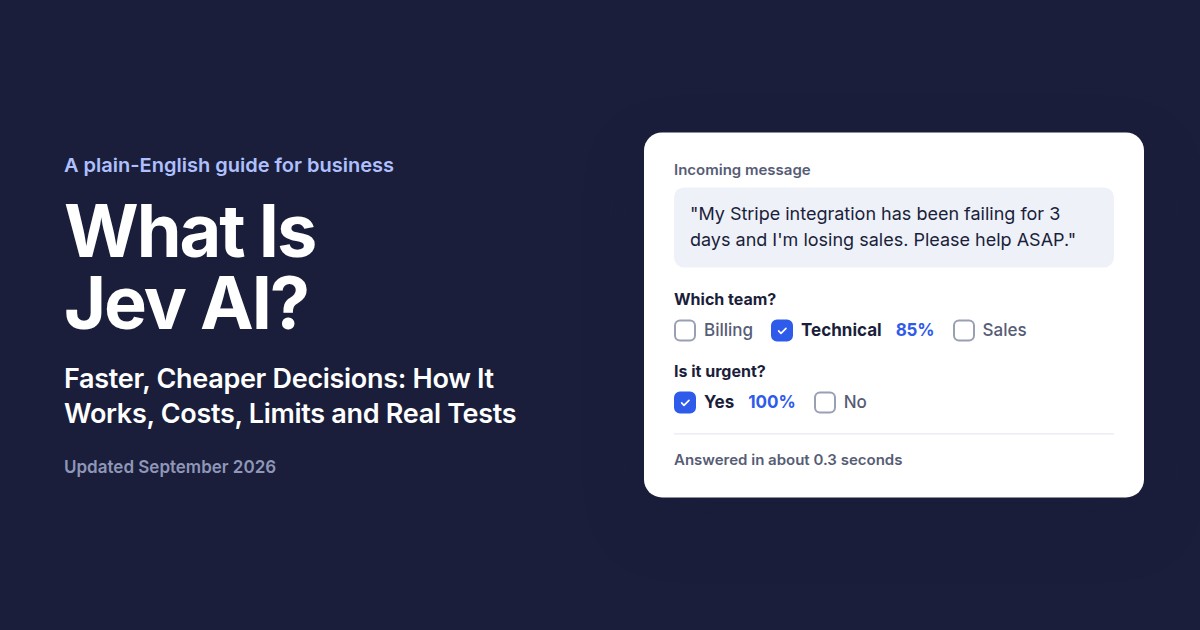
Jev is an AI model from TypeSafe AI, launched September 15, 2026, that makes quick decisions instead of writing text. You give it some information and a set of questions with fixed answer options, and it returns the answer plus how confident it is. It’s much faster and cheaper than chatbots like ChatGPT for simple sorting and yes/no tasks. Independent tests show it’s roughly as accurate as small AI models, not as accurate as the best ones. It’s best used alongside chatbots, not as a replacement.
In this guide
- Jev at a glance
- What is Jev, really?
- How is Jev different from ChatGPT, Claude, or Gemini?
- Why business leaders should pay attention
- Real-world scenarios
- What Jev can’t do (and the risks)
- Should your business use Jev?
- How to get started
- What independent tests actually show
- What people are saying
- What this means for the future of AI
- For developers
- Frequently asked questions
Jev at a glance
| Details | |
|---|---|
| Made by | TypeSafe AI (San Francisco) |
| Founder | Diogo Almeida (co-founder and CEO), formerly at OpenAI and Google Brain |
| Launched | September 15, 2026 (early access) |
| What it does | Returns decisions (yes/no, pick-one, rating) with confidence scores. Does not write text. |
| Price | $0.042 per million input tokens. Output is free. |
| Speed | 70 to 500 milliseconds per request (company figure) |
| Input | Text only. No images, audio, or video. |
| Best language | English |
| How to access | Waitlist at typesafe.ai, plus OpenRouter |
| Official docs | docs.typesafe.ai |
A note on the founder’s name: some articles spell it “Diego.” The official TypeSafe launch post and TechCrunch use “Diogo,” so that’s the one we use. Pricing and input details are from the official models page.
What is Jev, really?
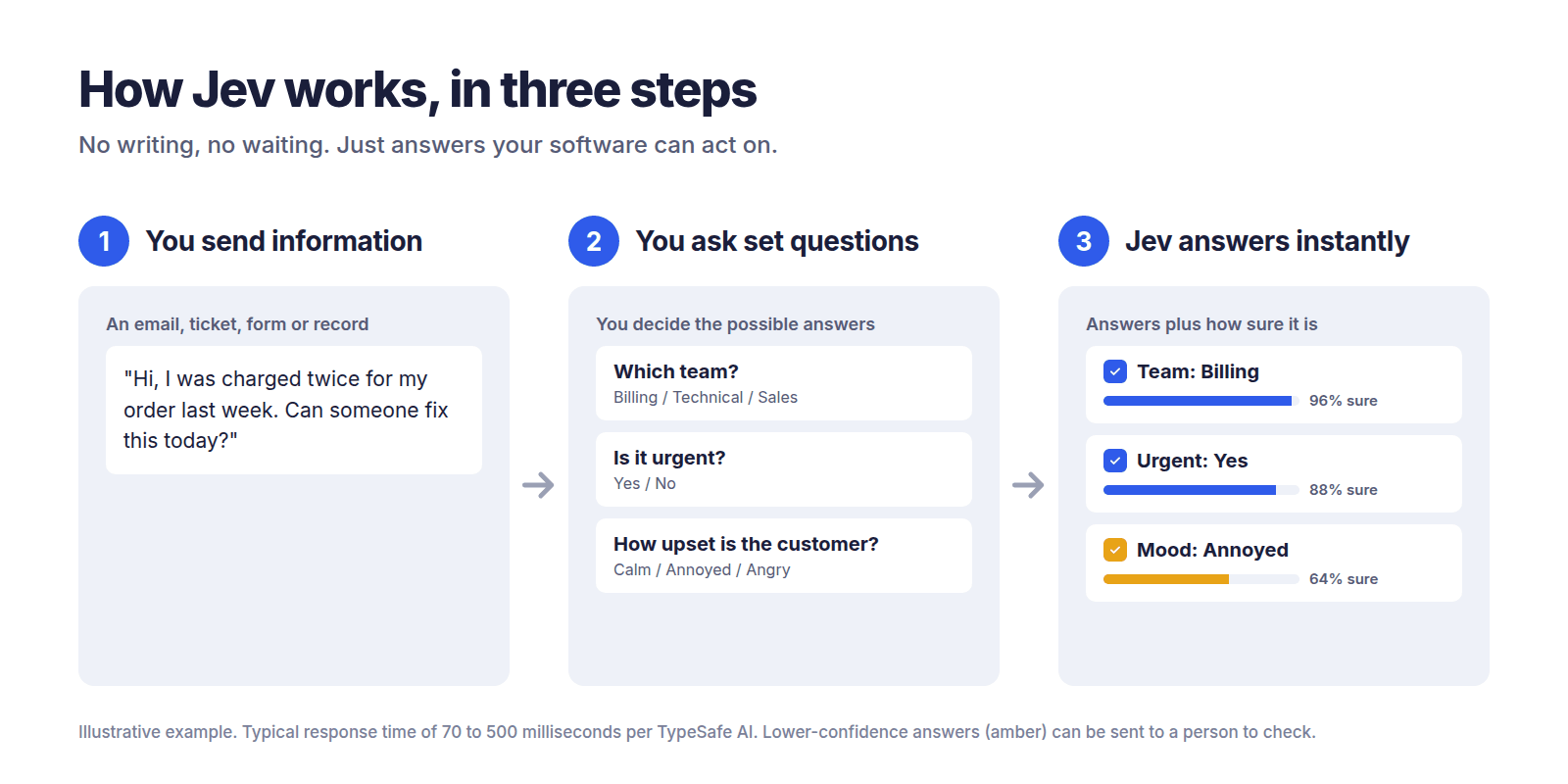
Jev is a “decision machine,” not a “writing machine.” It answers questions your software asks, using answer options you set in advance.
Here’s the simplest way to think about it:
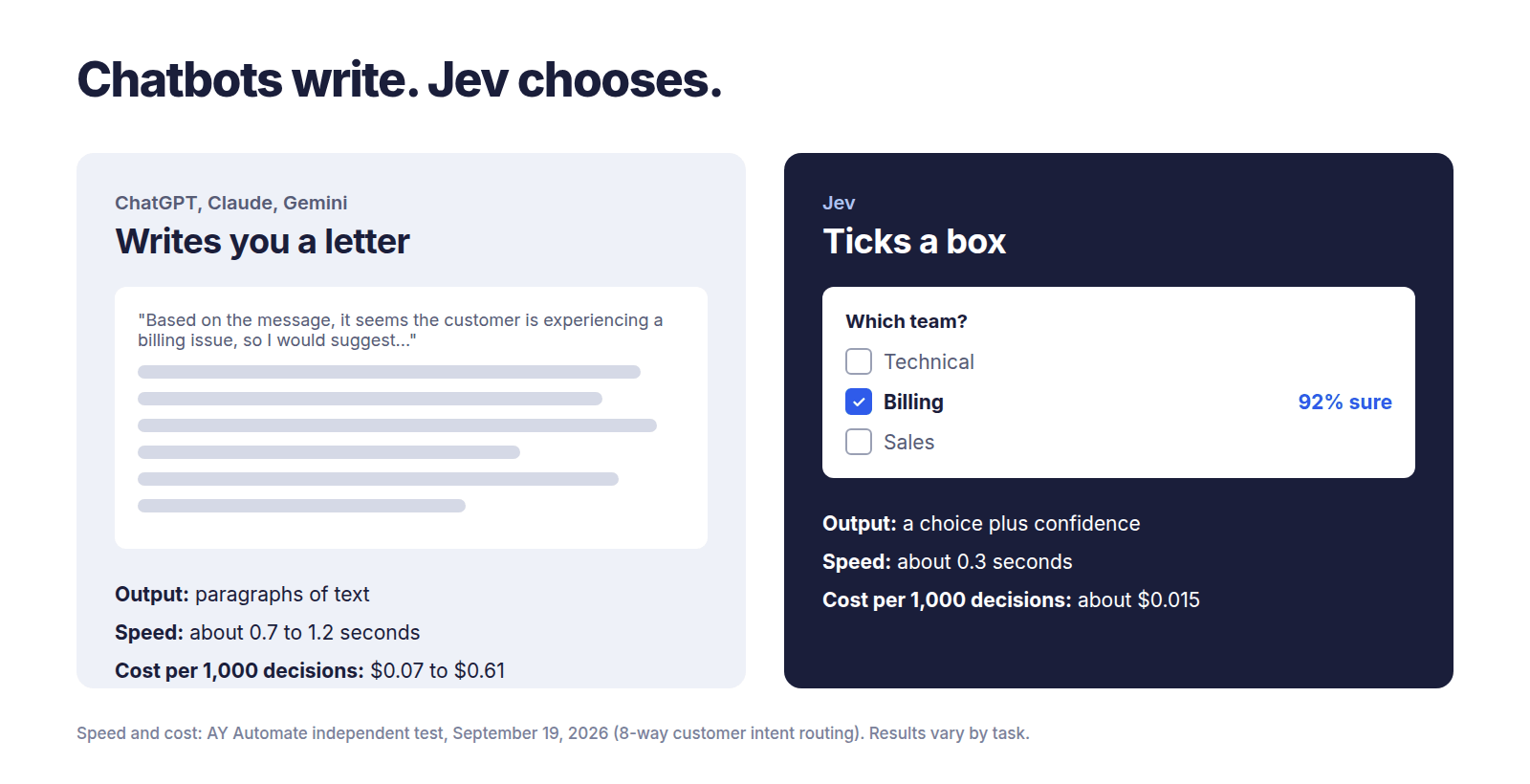
- ChatGPT is like someone writing you a letter. You ask a question, they write back a paragraph. Flexible, but slow, and you have to read it.
- Jev is like someone ticking boxes on a form in a split second. You hand them a form with options already printed. They tick one, and write “92% sure” next to it.
According to the official docs, Jev checks typed questions against a “state” and returns structured answers directly, with no text to generate and nothing to parse. “State” just means the information you’re asking about: an email, a customer record, a support ticket.
Why is it called a “System One” model?
The name comes from psychologist Daniel Kahneman’s famous book Thinking, Fast and Slow. He described two ways humans think:
- System 1: fast gut decisions. “That email looks like spam.”
- System 2: slow, careful reasoning. “Let me work through this tax problem step by step.”
TypeSafe says the name draws directly on this fast-versus-slow idea. Jev is built for the fast kind of judgment: the kind a knowledgeable person could make in a few seconds.
And why “Jev”?
It’s named after William Stanley Jevons, the 19th-century economist whose paradox describes how something getting cheaper can lead to it being used far more. TypeSafe’s bet is simple: make AI decisions cheap enough, and businesses will use them everywhere.
How is Jev different from ChatGPT, Claude, or Gemini?
The short answer: chatbots write, Jev chooses. That one difference changes speed, cost, and reliability.
Regular AI chatbots (called LLMs, or large language models) build their answer one word at a time. TypeSafe explains that Jev instead produces all its answers at once, in a single pass.
Three practical results for you:
- It’s faster, because it doesn’t write word by word.
- It’s cheaper, because output is free and input is priced per billion tokens instead of per million.
- It can’t give you a broken answer format. If you give it three options, you get one of those three. Always.
That third point is where the “can’t hallucinate” claim comes from, as TechCrunch reports. But be careful with that phrase. Jev can’t invent an answer outside your options, but it can still pick the wrong option. More on that later.
Comparison table
| Jev | Top-tier chatbot (e.g. GPT-5.6 Terra) | Small, cheap chatbot (e.g. Claude Haiku 4.5, Gemini Flash-Lite) | Traditional custom classifier | |
|---|---|---|---|---|
| What it outputs | A choice + confidence score | Written text | Written text | A label |
| Median speed per decision | 0.33 sec | 1.17 sec | 0.67 to 1.15 sec | Very fast |
| Cost per 1,000 decisions | ~$0.015 | ~$0.61 | ~$0.07 to $0.36 | Near zero to run |
| Risk of making things up | Can’t go outside your options, but can pick wrong | Can invent answers or break format | Can invent answers or break format | Can’t go outside labels |
| Needs training data? | No | No | No | Yes, lots of labeled examples |
| Best for | High-volume sorting, routing, yes/no checks | Complex reasoning, writing, analysis | Cheap everyday text tasks | One fixed task, very high volume |
| Not good for | Writing, math, complex reasoning | Cheap high-volume sorting | Hardest reasoning | Anything it wasn’t trained on |
Speed and cost for the first three columns come from one independent test on customer intent routing (AY Automate, September 19, 2026). Your results will vary by task. The “traditional classifier” column is general guidance, not a measured result.
Why business leaders should pay attention
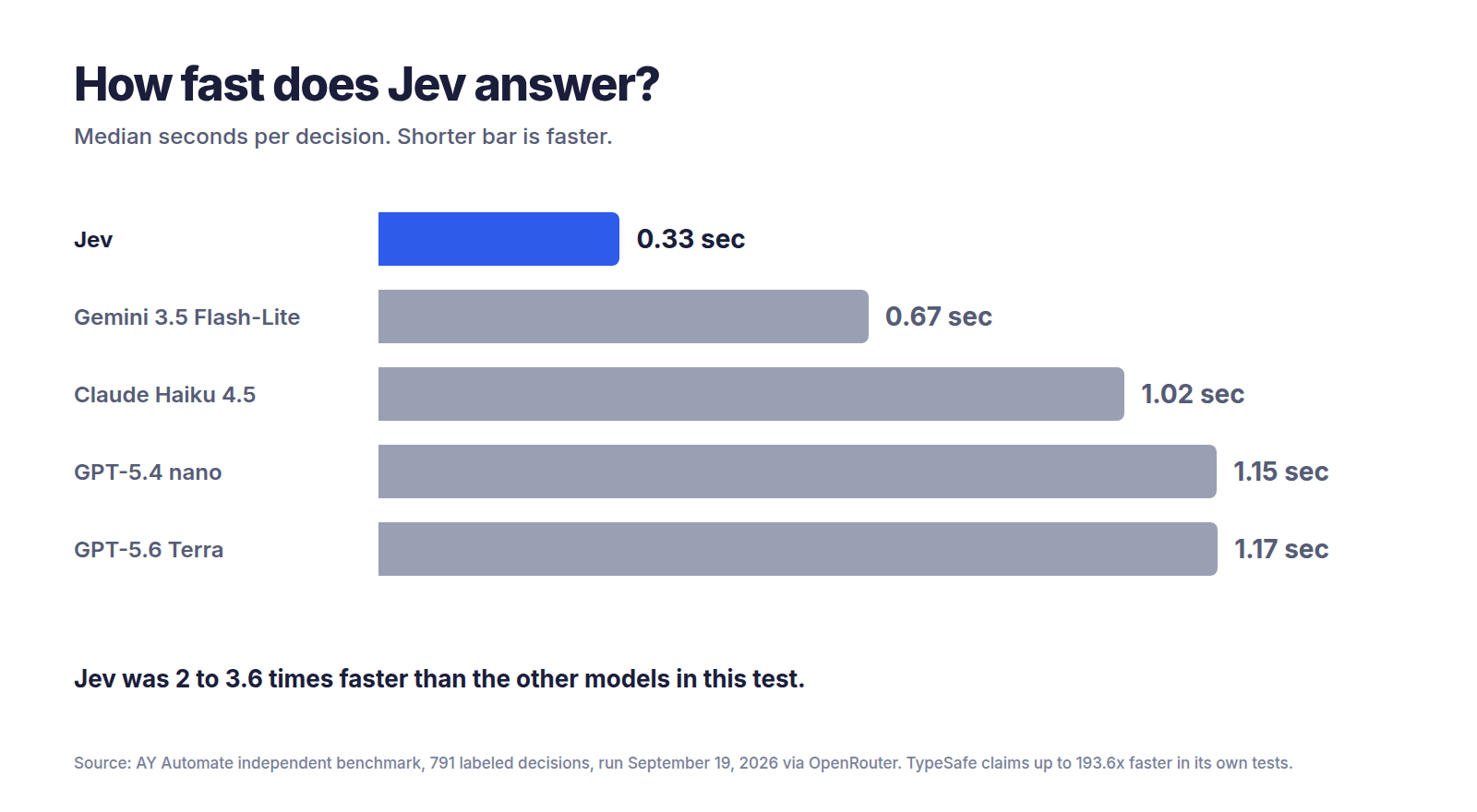
Jev could cut the cost of simple AI decisions by 25 to 40 times compared to top chatbots, and make them 2 to 4 times faster. That’s what independent testing shows so far, not the company’s much bigger claims.
A worked cost example
Let’s say your business sorts 1 million customer messages into categories each month. In one independent test, Jev cost $0.0151 per 1,000 decisions on a customer-routing task, versus $0.3565 for Claude Haiku 4.5 and $0.6089 for GPT-5.6 Terra.
| Model | Cost per 1,000 | Multiply by | Monthly cost for 1M messages |
|---|---|---|---|
| Jev | $0.0151 | 1,000 | ~$15 |
| Claude Haiku 4.5 | $0.3565 | 1,000 | ~$357 |
| GPT-5.6 Terra | $0.6089 | 1,000 | ~$609 |
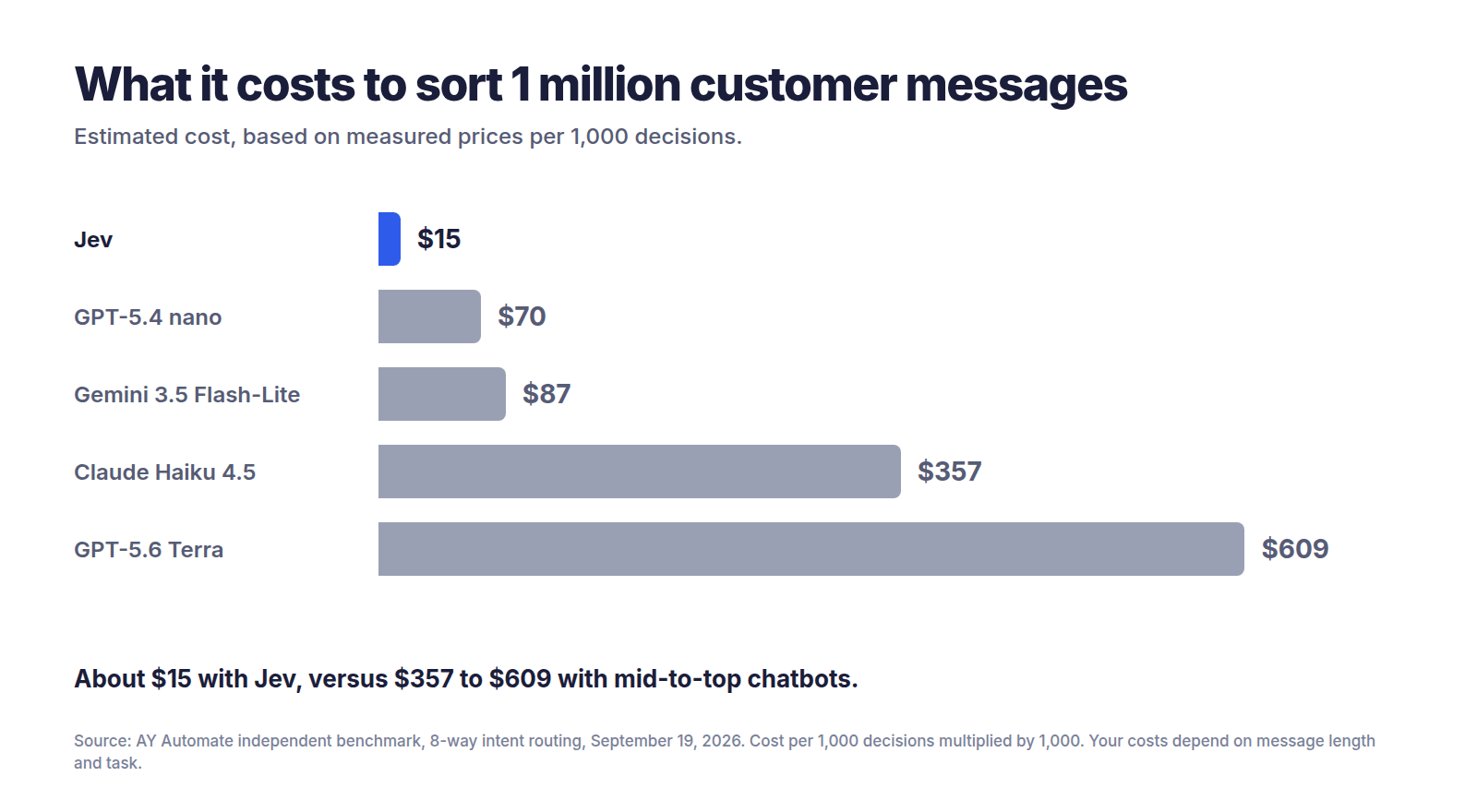
Is saving roughly $600 a month life-changing? For one task, maybe not. But businesses rarely have one task. If you run dozens of these checks on every customer interaction, it adds up fast. And the speed means you can put AI in places where waiting two seconds was never acceptable, like checking a form as someone fills it in.
The underrated benefit: confidence scores
This might matter more than the price. Every Jev answer comes with a number saying how sure it is. That lets your system follow a simple rule:
- Very sure? Act automatically.
- Unsure? Send it to a human or a smarter AI.
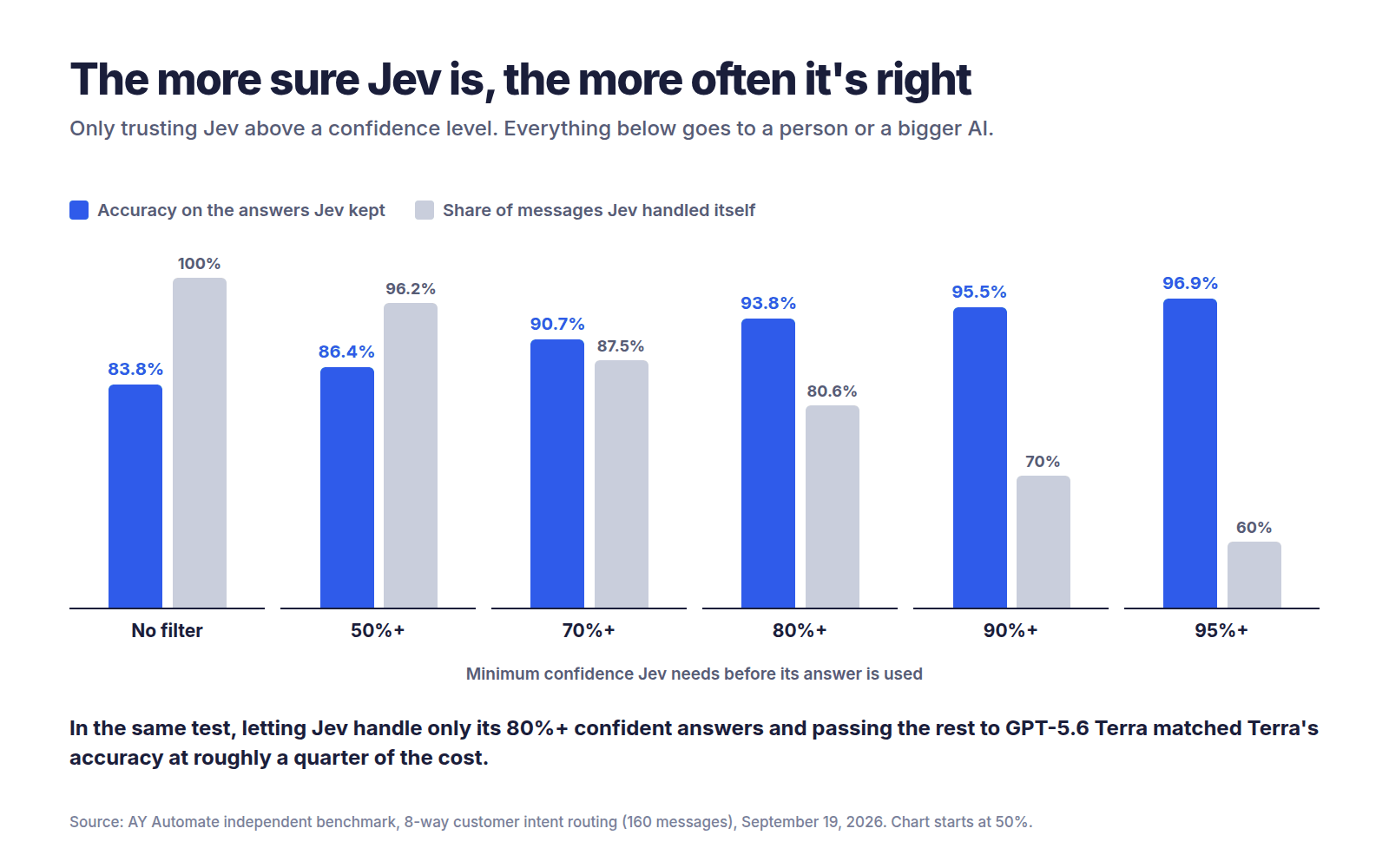
One developer quoted by TechCrunch, Bryo AI’s CTO, said this was the most interesting part: unlike other models, Jev gives back a real probability, which makes it well suited to automating workflows.
Real-world scenarios: how businesses could use Jev
Each of these is an illustration of how Jev could be used, based on the use cases TypeSafe and early developers describe. They’re not case studies from real companies.
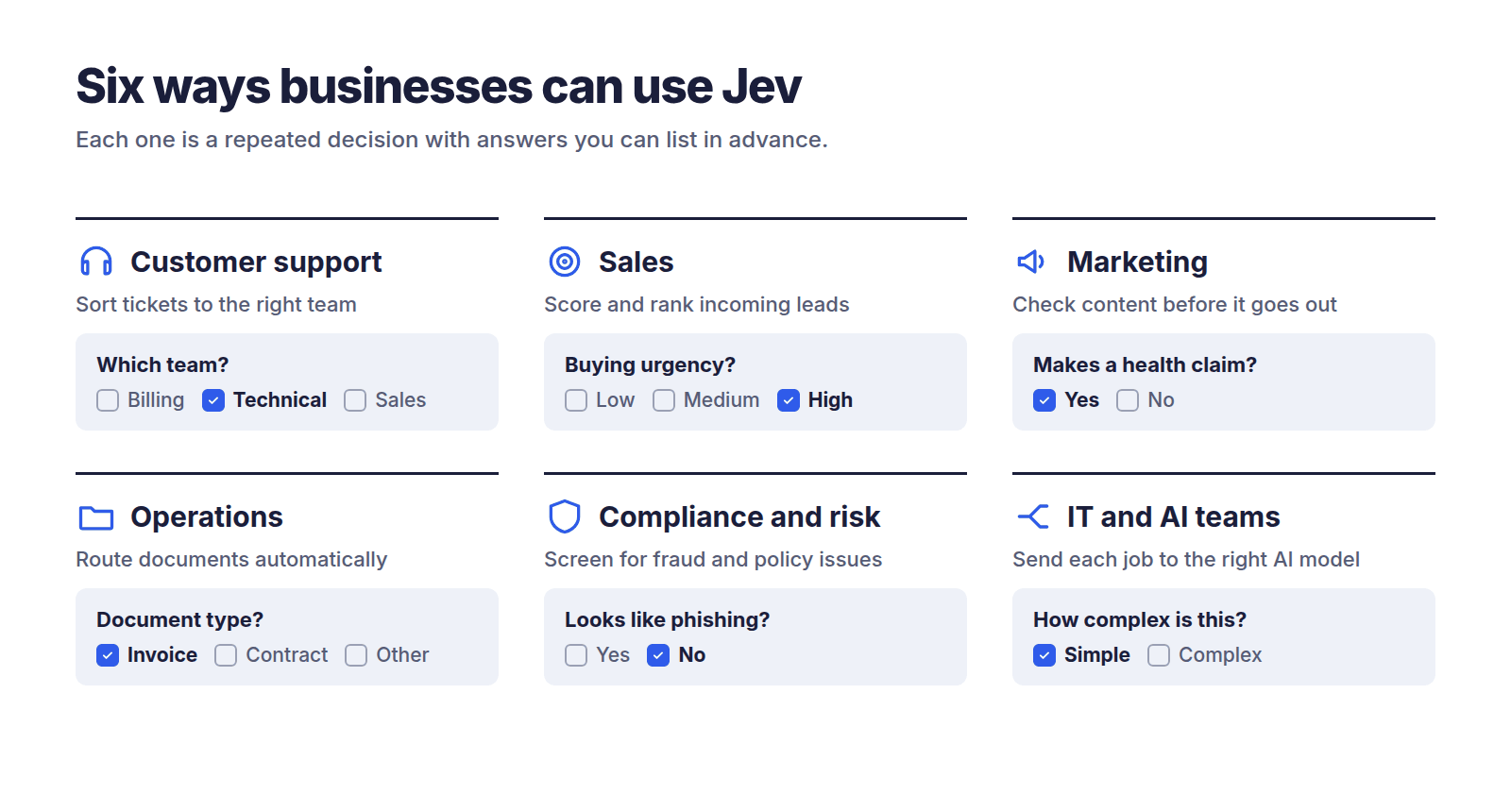
1. Customer support: sorting tickets instantly
The problem: Tickets land in one big pile. Someone has to read each one and send it to the right team.
How Jev helps: It reads each ticket and answers three questions at once: which team, how frustrated the customer is, and whether it’s urgent.
- In (from TypeSafe’s quickstart guide): “I’ve been trying to connect my Stripe account for 3 days and the integration keeps failing. I’m losing sales. Please help ASAP.”
- Out: Team = technical (85% likely), frustration = “frustrated but civil,” urgent = yes.
The benefit: Tickets reach the right person in under a second, and urgent ones jump the queue.
2. Sales: scoring leads
The problem: Sales reps waste hours on leads that were never going to buy.
How Jev helps: It scores each inquiry on separate questions like budget signals, company fit, and buying urgency. Your team combines the scores with its own formula, which is exactly what TypeSafe’s docs recommend.
The benefit: Reps call the best leads first. When priorities change, you adjust a weighting in your system instead of rewriting AI instructions.
3. Marketing: checking content before it goes out
The problem: Every social post, ad, and email needs checking for tone, brand fit, and risky claims.
How Jev helps: It asks yes/no questions about each draft. Does this make a health claim? Is the tone off-brand? Does it mention a competitor?
The benefit: Risky content gets flagged for a human before it’s published, without slowing everything else down.
4. Operations: routing documents
The problem: Invoices, contracts, and forms arrive by email and need to go to the right folder or person.
How Jev helps: It classifies each document by type and department.
The benefit: Less manual sorting. Documents Jev is unsure about get flagged instead of misfiled.
5. Compliance and risk: screening messages
The problem: Some messages contain fraud attempts, phishing, or content that breaks policy.
How Jev helps: It checks each message against specific risk questions and gives a probability for each.
The benefit: You choose how strict to be. A bank might flag anything above 10% risk. A casual forum might only flag above 90%.
6. IT and AI teams: sending each job to the right AI
The problem: Companies using AI often send every request to their most expensive model, even simple ones like “what are your opening hours?”
How Jev helps: It decides in a fraction of a second whether a request is simple or complex, and routes it to a cheap or powerful AI. Earendil CTO Armin Ronacher told TechCrunch this kind of model routing is a strong use, since using a full chatbot just to make that decision would be expensive.
The benefit: You pay premium prices only for premium problems.
What Jev can’t do (and the risks)
Jev is a specialist, not an all-rounder. TypeSafe deserves credit here: it publishes its own list of weak spots.
- It doesn’t write anything. No emails, summaries, or reports. TypeSafe itself points people to other models for text.
- It’s bad at math, counting, and dates. TypeSafe says plainly that Jev is not a calculator and reads dates as text. Keep numbers in your regular software.
- It takes your questions very literally. It answers the question you wrote, not the one you meant. Vague questions get unreliable answers.
- “Can’t hallucinate” doesn’t mean “always right.” In one independent test, answers given with 90%+ confidence were still wrong 5 times out of 112 on one task and 12 out of 153 on another.
- You have to define the options. If none of them fit, Jev still picks one. Testers recommend always including a “none of these” option.
- It can be tricked. The docs admit that text written to deliberately steer the model can change its answer.
- English works best. Other languages work but not equally well, so the docs advise testing non-English content first.
- Business risks. TypeSafe is a young startup, Jev is in early access, and nothing else is quite like it yet, which means vendor lock-in risk. Rate limits are changing while the company handles demand, and TypeSafe admits it can’t yet prove its low prices aren’t subsidized.
Should your business use Jev?
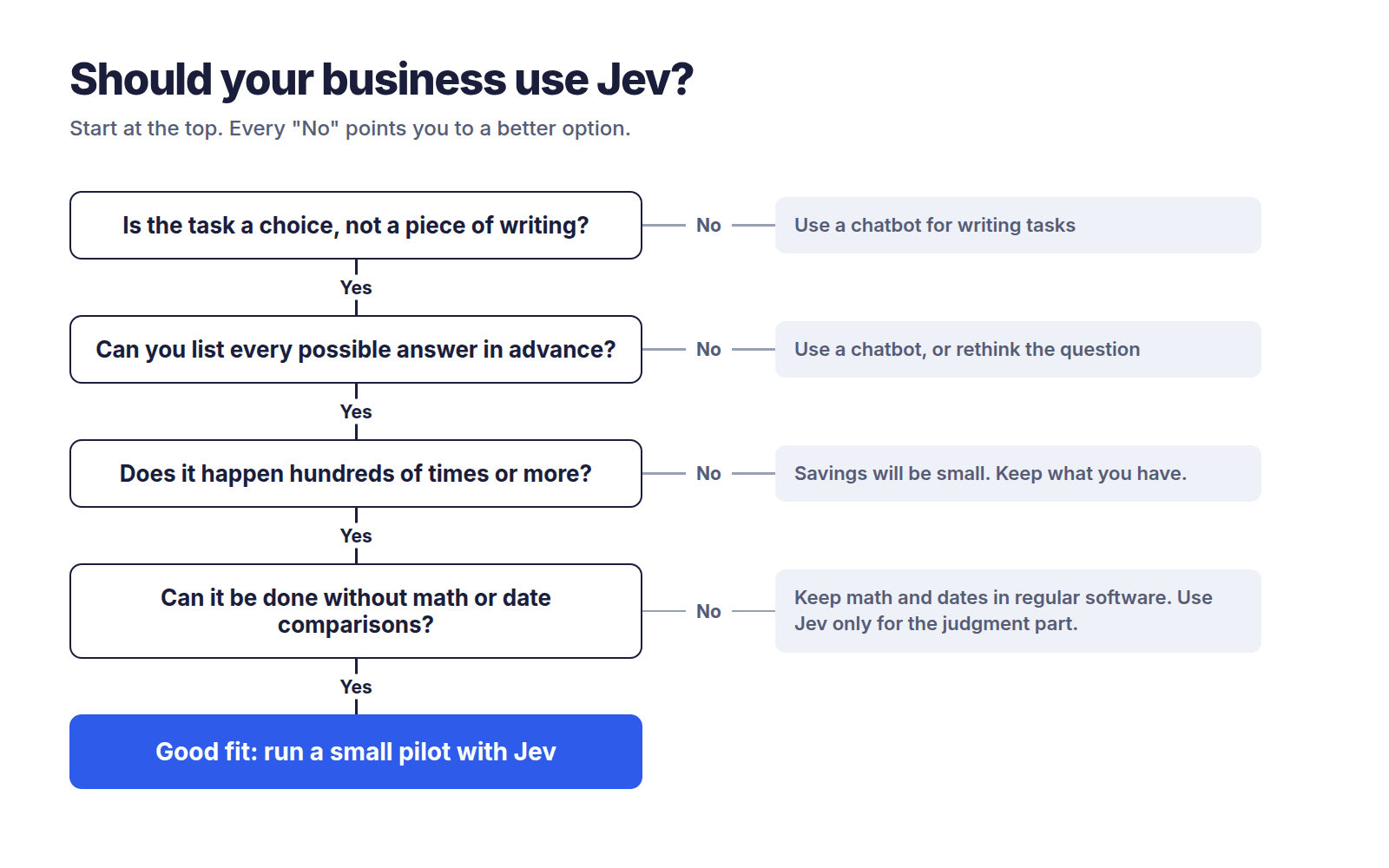
Use this quick checklist. If you answer “yes” to most of these, Jev is worth a small pilot.
- ✅ Is the task a choice, not a piece of writing? (yes/no, pick a category, rate 1 to 5)
- ✅ Does it happen hundreds or thousands of times a day or week?
- ✅ Can you list all the possible answers in advance?
- ✅ Is speed important, or is cost adding up?
- ✅ Is the content mostly text in English?
- ✅ Can you handle mistakes by sending unsure cases to a person or another AI?
Probably not a fit if:
- ❌ You need written output (emails, summaries, reports)
- ❌ The task involves calculations or comparing dates
- ❌ Every single decision must be as accurate as possible, whatever it costs
- ❌ You only do the task a few times a week, so the savings won’t matter
How to get started (non-technical version)
Start small: one task, one month, clear numbers. Here’s a simple path any manager can follow.
- Pick one repetitive decision. Something your team or AI does hundreds of times, like tagging support tickets or flagging risky messages.
- Write down the questions and the possible answers. Be specific. “Which team should handle this: billing, technical, or sales?” beats “What’s this about?”
- Gather 100 to 200 real examples with the correct answers. This is your answer key for testing.
- Ask your tech team (or partner) these questions: Can we test Jev on our examples and compare it to what we use now? What confidence level should trigger a human review? What happens if TypeSafe changes pricing or has downtime? Where does our data go? (TypeSafe says Jev isn’t trained on customer requests, and zero data retention is available for enterprise customers.)
- Run a side-by-side pilot for 2 to 4 weeks. Track accuracy, speed, cost, and how many cases got sent to people.
- Decide with numbers, not hype. If Jev handles the confident cases well and saves real money, expand. If not, you’ve lost very little.
If you don’t have developers in-house, a partner experienced in custom AI software development can help you run the pilot and connect Jev to the tools you already use.
What independent tests actually show
This section was last updated on September 22, 2026. Jev is new and results are changing quickly.
The short version: Jev is genuinely faster and much cheaper, but not as dramatically as TypeSafe claims, and it’s about as accurate as small AI models rather than top ones.
What TypeSafe claims
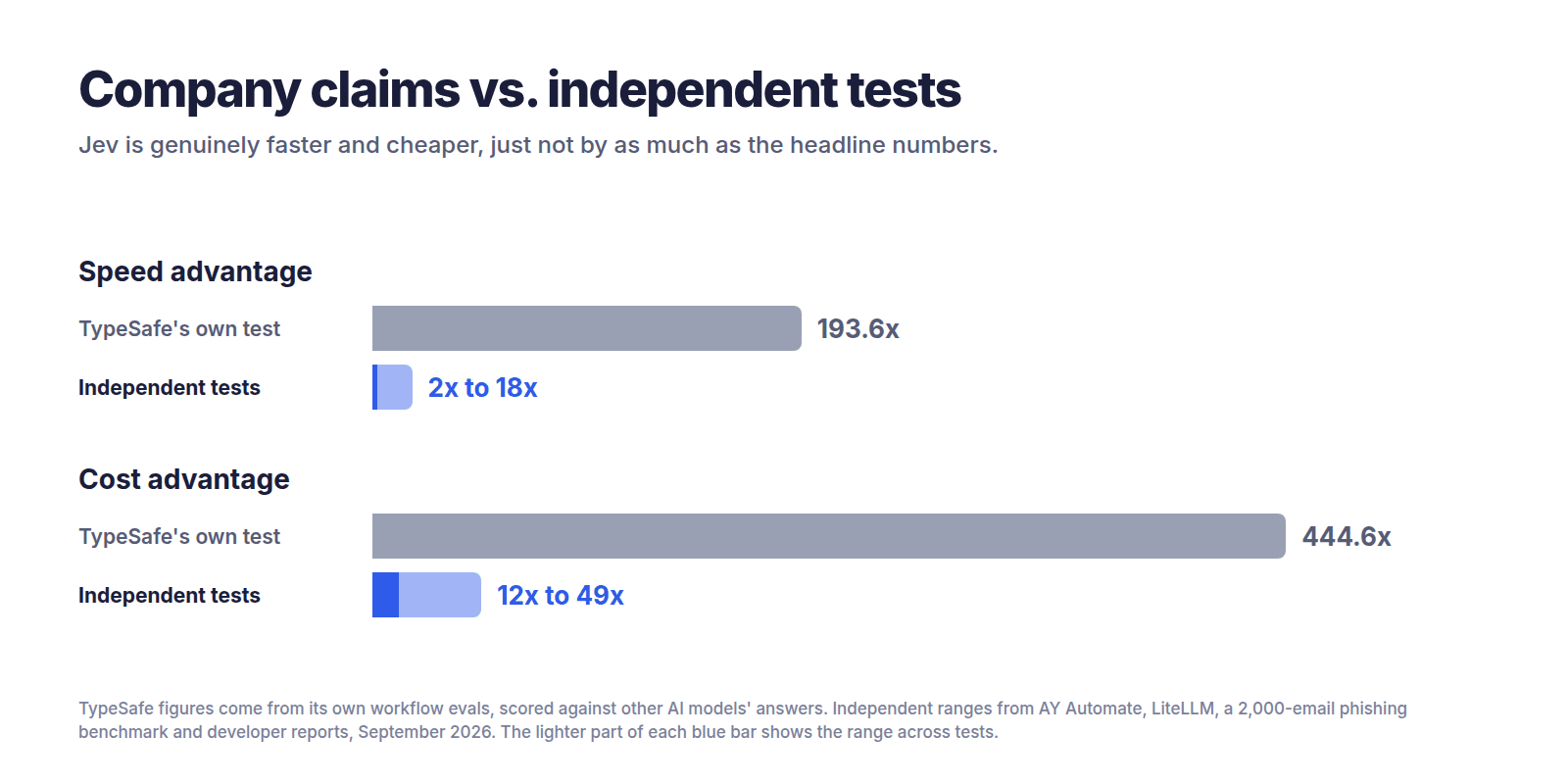
TypeSafe’s homepage advertises that Jev is 193.6 times faster and 444.6 times cheaper. The company’s launch post says these figures come from its own workflow tests and that it expects them to be on the high end of real-world gains.
There’s an important catch in how those tests were scored. TypeSafe used the average answers of two big AI models (GPT-6 Astra and Fable 5.1) as the “correct” answers, and admits this tilts results toward OpenAI and Anthropic’s models. It also notes the test workflows were built by its own team, so some bias could exist.
In plain terms: that test measures how well Jev copies big AI models cheaply, not whether it’s right about the real world. TypeSafe was upfront about this, which is to its credit.
What outside testers found
| Who ran it | Date | Task | Size | Compared against | Speed | Cost | Accuracy | Link |
|---|---|---|---|---|---|---|---|---|
| TypeSafe (company) | Sep 15 | 4 business workflows | Not stated | Average of GPT-6 Astra and Fable 5.1 | 193.6x faster | 444.6x cheaper | Scored against other AIs, not true answers | Source |
| Independent phishing benchmark | Sep 17 | Spot phishing emails | 2,000 synthetic emails | Claude Haiku 4.5 | Not reported | ~12x to 27x cheaper | 62.6% vs 81.3% (one question); 95.0% vs 93.2% (five questions) | Source |
| Vercel engineer (social post) | ~Sep 17 | Safety check on commands | Not stated | OpenAI model | 5x to 18x faster | Not stated | Reported as more accurate | Source |
| Bryo AI CTO (social post) | ~Sep 17 | Sort business emails | Not stated | Gemini | Not stated | Gemini 10x to 20x pricier | Gemini slightly more accurate | Source |
| AY Automate | Sep 19 | Customer intent routing + prompt-injection detection | 791 decisions | 4 AI models incl. GPT-5.6 Terra and Claude Haiku 4.5 | 2x to 3.6x faster | 4.7x to 49x cheaper | Level with small models, behind Terra | Source |
| priorbench (GitHub) | Sep 20 | 21 experiments | 5,721 calls | Keyword rules, basic machine learning | ~430 ms per call | $0.176 in total | 95.9% vs 77.2% (keywords) and 66.0% (basic ML) | Source |
| LiteLLM | ~Sep 20 | Routing requests to the right AI | Not stated (synthetic) | Claude Haiku 4.5 | 5.43x faster | ~96% cheaper | 95% vs 73.75% on expected tiers | Source |
What the tests say, in plain language
On speed: every test found Jev faster, but by 2 to 18 times, not 190. AY Automate found Jev 2 to 3.6 times faster and said the advertised figures did not show up against its comparison models. LiteLLM measured a median of about 127 milliseconds for Jev versus about 688 for Claude Haiku.
On cost: consistently much cheaper, typically 12 to 49 times less than mid-to-top AI models. Still a big saving, just not 444 times.
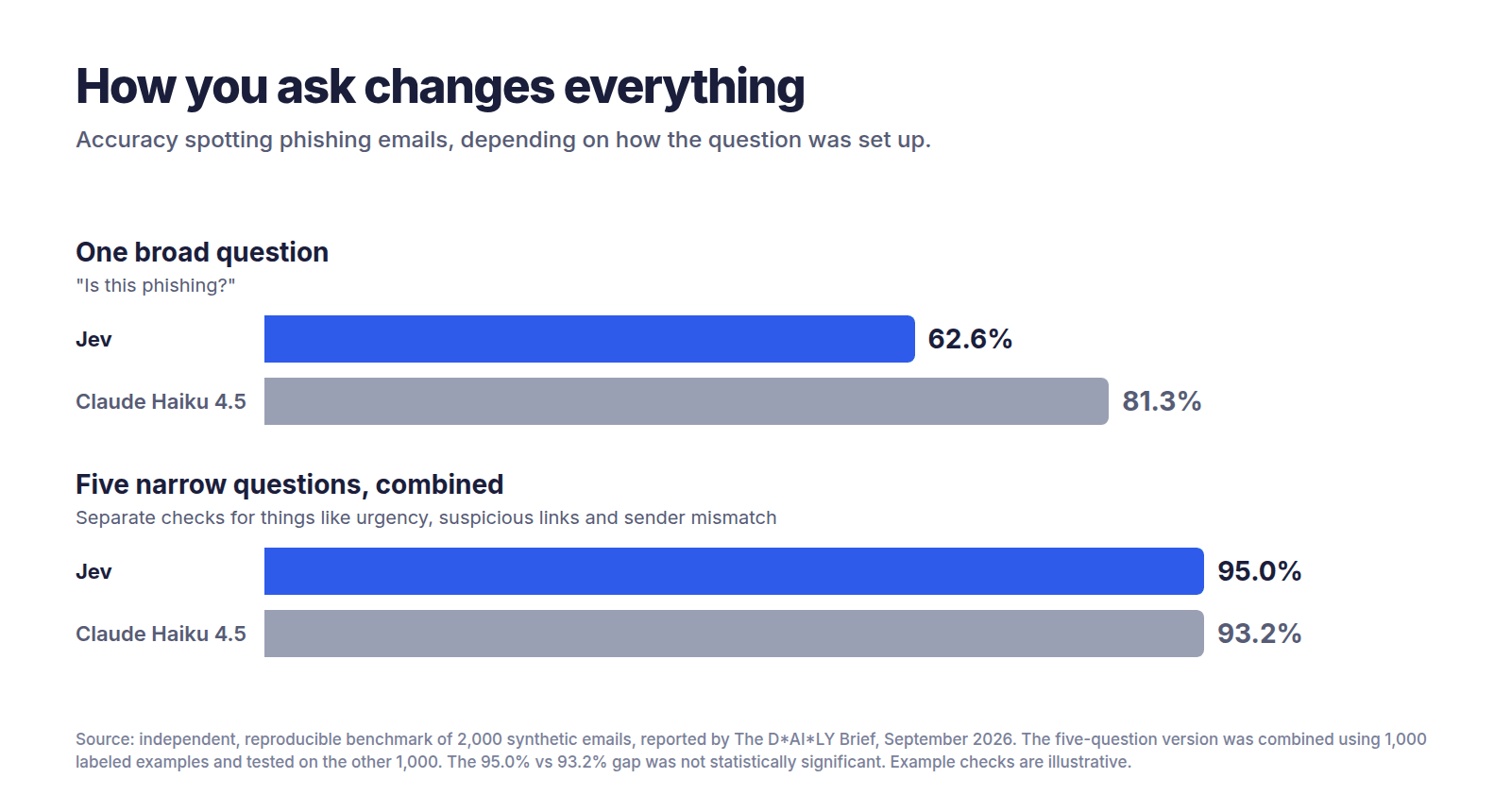
On accuracy, it depends heavily on how you ask. This is the most important finding for business readers. In the phishing test, Jev scored 62.6% when asked one broad question, against Claude Haiku’s 81.3%. Split into five narrow questions, it reached 95.0%. Getting there did take 1,000 labeled examples and some statistical work.
On confidence scores, the real star: when AY Automate let Jev answer only what it was at least 80% confident about and sent the rest to GPT-5.6 Terra, the combined accuracy matched Terra alone at roughly a quarter of the cost. That’s a practical strategy any business can copy.
One surprise in Jev’s favor: the priorbench evaluation reported 95.9% accuracy with no training on its 400-item test, and even said TypeSafe’s own documentation undersells the model.
Why do the results differ so much?
- Different tasks. Sorting tickets is easier than spotting clever phishing.
- How the question is asked. One vague question versus several sharp ones can swing accuracy by 30 points.
- Test size. Some tests used 2,000 items, others a handful of social media examples.
- Real versus synthetic data. Several tests used made-up examples.
- Who ran it. Company tests favor the company. Some outside testers also sell AI services.
- What it’s compared to. Beating an expensive model with reasoning switched on looks very different from beating a small, fast one.
The takeaway for business readers
Jev is great at fast, cheap, high-volume decisions, especially when you split big questions into small ones and use its confidence score to decide when to trust it.
Jev is weaker at matching top-tier AI accuracy on a single broad question.
What that means for you: don’t swap out your best AI completely. Put Jev in front of it. Let Jev handle the easy, confident cases cheaply, and pass the tricky ones up.
What people are saying
Developers are excited. Careful reviewers are cautiously positive. Hype videos are the problem.
The praise
- Demand at launch was so high that TypeSafe briefly couldn’t serve users from its API, according to TechCrunch.
- A Vercel software engineer reported that swapping an OpenAI model for Jev in a safety check gave results 5 to 18 times faster, with better accuracy.
- Armin Ronacher pointed out that Jev hands some responsibility back to the user: a 50% answer might be a coin toss to ignore, while a 95% answer is one you can act on.
The criticism
- One review criticized a 33-minute YouTube explainer for calling Jev one of the biggest events in computer science history while leaving out its limitations entirely.
- The same review noted that every speed and cost figure in the launch came from tests TypeSafe built itself.
- Almeida hasn’t shared much about how the model is built, and outside observers suspect it sits on top of an open-weight language model. This hasn’t been confirmed.
What this means for the future of AI
This section is opinion.
For three years, the AI race has been about building bigger, smarter chatbots. Jev suggests a different path: smaller, specialized AI “parts” that slot into ordinary software, the way a calculator chip slots into a cash register.
If that idea catches on, most AI in the future may not look like chatting at all. It’ll be invisible: thousands of tiny, cheap decisions happening inside the apps you already use.
Jev probably won’t be alone for long. Ronacher told TechCrunch he expects competitors now that the approach has proved useful. For businesses, that competition should mean lower prices and more choice. The smart move today isn’t betting everything on Jev. It’s learning which of your decisions could run on this kind of model, so you’re ready whichever vendor wins.
For developers
Business readers can skip to the FAQs. This section covers the technical details.
Technical overview
- Architecture: transformer-based but not an LLM. TypeSafe describes a new model architecture, a parallel sampler, and a training method called Reinforcement Learning for Calibrated Decisions (RLCD). (Source)
- Training data: Almeida says Jev is trained only on synthetic data. (Source)
- Three question types: Choice (pick from a list), Score (rate against a rubric), and Noul (is this statement true?). All three can be mixed in one call and are evaluated in parallel against the same state. (Source)
- Limits: 64k tokens per request, with 32k for the state plus the longest question; 250,000 tokens per second and 1,200 requests per minute. (Source)
- No fine-tuning: the same weights serve every account. You shape answers through the state, instructions, and criteria.
Quickstart
- Join the waitlist and get an API key from the TypeSafe console.
- Try queries without code in the Playground.
- Call the endpoint:
POST https://api.typesafe.ai/v1/systemone
Python (from the official quickstart; requires Python 3.10+):
pip install typesafe-sdkfrom typesafe_sdk import Choice, Noul, Score, TypeSafeClient
client = TypeSafeClient() # reads TYPESAFE_API_KEY from the environment
ticket = "Hi, I've been trying to connect my Stripe account for 3 days and the integration keeps failing. I'm losing sales. Please help ASAP."
response = client.system_one(
state=ticket,
questions={
"department": Choice(
instructions="Which team should handle this",
criteria={
"billing": "Payment or subscription issues",
"technical": "Bugs or integration problems",
"sales": "Pricing or account questions",
},
),
"frustration": Score(
instructions="How frustrated the customer appears",
criteria=[
"Calm, just stating facts",
"Frustrated but civil",
"Very angry, strong language",
],
),
"is_urgent": Noul(
instructions="The message conveys urgency or time-sensitivity",
),
},
)
print(response.answers["department"].choice) # "technical"
print(response.answers["frustration"].score) # 1.0
print(response.answers["is_urgent"].noul) # 1.0JavaScript / TypeScript (from the official SDK page; requires Node.js 20+):
npm install @typesafe-ai/sdkimport { choice, TypeSafeClient } from "@typesafe-ai/sdk";
const client = new TypeSafeClient();
const response = await client.systemOne({
state: { document: "I was charged twice. Please fix this ASAP." },
questions: {
category: choice("What is this ticket about?", {
billing: null,
technical: null,
other: null,
}),
},
});
console.log(response.answers.category.choice);Confidence-gated routing (illustrative)
The API returns a confidence field on Choice and Score answers. The routing logic below is our own illustration, not official code. Check the SDK reference for the exact attribute name before using it.
THRESHOLD = 0.80  # tune this on your own labeled data

answer = response.answers["department"]
if answer.confidence >= THRESHOLD:
    route_to_team(answer.choice)        # act automatically
else:
    escalate_to_llm_or_human(ticket)    # send unsure cases up
Common patterns
- Classification: Choice questions with a clear description for each option.
- Model routing: classify how complex a request is, then send it to a cheap or strong LLM.
- Agent monitoring and guardrails: Noul questions on agent actions or prompts, such as “Does this try to override instructions?”
- Context pruning: score which retrieved passages or tool results are still relevant before passing them to an LLM.
- Composite scoring: several small Score questions, weighted in your own code.
Gotchas and failure modes
- Ask many questions in one call; don’t chain calls. The priorbench evaluation found a fixed cost of about 430 ms per call, while 800 judgments packed into one call took under a second and cost a fraction of a cent.
- Always offer a “none of these” option. Forced choices make Jev pick the least-wrong answer.
- Tune thresholds on your own data. Confidence tracks accuracy, but not perfectly.
- Pin the model version. The
jev-latestalias moves when new versions ship, so TypeSafe recommends pinning a versioned ID if you’ve tuned thresholds. - Don’t expect logic between separate questions. TypeSafe’s docs show a question and its opposite, asked separately, returning probabilities that add up to more than 1.
- Keep the state lean. Irrelevant content lowers accuracy, so filter first.
- Do math and dates in code. Use Jev to pull out the parts; do the calculation yourself.
Developer resources
- Official docs and full docs index (llms.txt)
- Quickstart
- Models, pricing and limits
- Known weaknesses: Jev 1.13 jaggedness
- Python SDK and JavaScript SDK
- HTTP API reference
- Cookbooks (guardrails, RAG passage scoring, citation checks, extraction cascades)
- Agent skill for Claude Code and other coding agents
- LangChain guide: building a harness with Jev
- LiteLLM auto-router benchmark
- priorbench independent evaluation (GitHub, raw data)
- AY Automate benchmark with reproducible code
- TypeSafe workflow evals
- TypeSafe Discord
Frequently asked questions
What is Jev AI?
Jev is an AI model from TypeSafe AI, launched September 15, 2026, that makes fast decisions instead of writing text. You give it information and questions with fixed answer options, and it returns an answer plus a confidence score. It’s designed for high-volume tasks like sorting, routing, and yes/no checks inside business software.
What is a System One model?
A System One model is a type of AI built for fast, gut-feeling decisions rather than slow reasoning or writing. The name comes from Daniel Kahneman’s “System 1” and “System 2” thinking. Jev is the first model of this kind, returning structured answers your software can use directly without reading any text.
Can Jev replace ChatGPT?
No. Jev doesn’t write text, so it can’t draft emails, summarize documents, or hold conversations. It replaces ChatGPT only for simple decision tasks, like sorting messages into categories. Most businesses will get the best results using both: Jev for fast, cheap decisions and a chatbot for writing and complex reasoning.
Is Jev free?
No, but it’s very cheap. Jev charges $0.042 per million input tokens, and output is free. In one independent test, sorting 1,000 customer messages cost about 1.5 cents. Access is currently through an early-access waitlist, and TypeSafe says it can’t yet prove its pricing is sustainable long term.
How much does Jev cost compared to other AI models?
Independent tests found Jev 4.7 to 7.5 times cheaper than the cheapest small AI models, and 24 to 49 times cheaper than Claude Haiku 4.5 and GPT-5.6 Terra per decision. TypeSafe claims up to 444.6 times cheaper, but that figure comes from its own tests and hasn’t been matched independently.
Is Jev really 100 times faster?
Not in independent tests so far. TypeSafe claims up to 193.6 times faster, but outside testers measured 2 to 18 times faster, depending on the task and the comparison model. Jev typically responds in about a third of a second. That’s a meaningful speed-up, just not as dramatic as the headline numbers.
Does Jev make things up?
Jev can’t invent answers outside the options you give it, and it never returns a broken format. But it can still choose the wrong option, sometimes confidently. Independent testers found confident mistakes, especially when answer options overlapped. Use its confidence score and send unsure cases to a person or a stronger AI.
How accurate is Jev?
In independent tests, Jev was roughly as accurate as small AI models like Claude Haiku 4.5 and Gemini Flash-Lite, but less accurate than top models like GPT-5.6 Terra. Accuracy depends heavily on how you ask. Splitting one broad question into several narrow ones improved accuracy dramatically in one test.
Is my data safe with Jev?
According to TypeSafe, Jev is not trained on customer requests or responses. Zero data retention is available for enterprise customers, and the company publishes a Data Processing Agreement and privacy policy. As with any AI vendor, review these documents with your legal or IT team before sending sensitive data.
Is Jev open source?
Based on the information available, no. TypeSafe hasn’t released Jev’s model weights or full details of how it’s built. However, its software development kits (SDKs) and agent skills are published on GitHub, so developers can freely use the tools that connect to Jev’s paid API.
Do I need a developer to use Jev?
To try it, no. TypeSafe’s online Playground lets you paste text and ask questions without code. To use it in your business, yes. Jev is built to plug into software, so you’ll need a developer or technology partner to connect it to your email, CRM, support desk, or other systems.
Can Jev read images or PDFs?
Not directly. Jev currently accepts text only, with no image, audio, or video input. To use it on PDFs or scanned documents, you’d first convert them to text with another tool, then send that text to Jev. TypeSafe has said it plans to build versions that handle other formats.
Does Jev work in languages other than English?
Yes, but English works best. TypeSafe says other languages, including Chinese, Japanese, and Korean, are handled but not equally well. If your business works mainly in another language, test Jev on your own content first and pay close attention to its confidence scores.
Who created Jev?
Jev was created by TypeSafe AI, a San Francisco startup co-founded by CEO Diogo Almeida. Almeida previously worked at OpenAI and Google Brain and is credited with helping develop RLHF, InstructGPT, and ChatGPT. He left OpenAI about two years before Jev’s launch to start TypeSafe.
The bottom line
Jev isn’t a smarter chatbot. It’s a fast, cheap decision-maker that does one job well: answering structured questions at huge volume. Independent tests confirm real speed and cost savings, though far smaller than TypeSafe’s headline claims, with accuracy similar to small AI models. Your next step: pick one repetitive decision in your business, gather 100 real examples, and run a small side-by-side test before committing to anything.
Sources
All accessed September 22, 2026.
- TypeSafe AI, “Introducing System One Models & Jev” (September 15, 2026)
- TypeSafe Docs, Introduction
- TypeSafe Docs, Quick start
- TypeSafe Docs, Models
- TypeSafe Docs, Jev 1.13 jaggedness
- TypeSafe Docs, JavaScript SDK
- TechCrunch, “A new kind of AI model from a ChatGPT inventor is thrilling developers” (September 18, 2026)
- AY Automate, “Jev vs GPT and Claude: Independent Benchmark” (September 20, 2026)
- priorbench, independent evaluation of Jev (GitHub)
- LiteLLM, JEV classifier benchmark
- The D*AI*LY Brief, phishing benchmark analysis
- North Denver Tribune, review of Jev launch claims
- LangChain, “Building a harness with Jev”